


Managing a construction project is about protecting your margins and your liability just as much as it is about moving dirt and hanging drywall. Without a centralized system, profit fade becomes inevitable—often the result of unbilled change orders, schedule delays, or rework caused by crews building off outdated drawings. Beyond catching these financial leaks, project management software provides a massive shield against compliance traps and legal disputes. By enforcing mandatory daily logs and time-stamped photo documentation, these tools protect general contractors against subcontractor claims while satisfying strict OSHA requirements. In this guide, we break down the top software solutions by trade, operational focus, and company size to help you find the perfect digital backbone for your business.
Best Construction Project Management Software
| Company | Best For | Pricing | Get Started |
|---|---|---|---|

Procore
|
Best overall construction management software; fully cloud-based and accessible on any device | $$$$ | |

Buildertrend
|
Home builders and remodelers; residential-focused features with pricing based on annual construction volume | $$$ | |

Contractor Foreman
|
Small to midsize contractors; affordable project management software with broad features for office and field teams | $ | |

Autodesk Forma
|
All project sizes, including enterprise and small businesses; modular software packages with new 2026 starter packages for smaller teams | $$$$ |
*We may earn a commission when you click through these links.
Table of Contents
Construction Management Software Reviews
All of the products included in this guide meet a high set of standards, ranking well across the core metrics we reviewed. These include total cost of ownership, customer reviews, user experience, and advanced features such as AI-driven predictive analytics and sustainability tracking. Review our complete rating methodology below to learn more about how we evaluated these products.
Procore (Best Overall)
Procore is one of the most popular and complete construction project management software products on the market. Its customer reputation is stellar, earning positive reviews across the web. Procore went public in May of 2021 after operating as a private company based in California since 2002. Along with project management, Procore offers field service, quality management, safety management, and financial management software as well.
Pros
- The best user interface of any product we reviewed
- Core construction project management functionality is the best on the market
- Outstanding customer service, training, and ongoing technical support
Cons
- It’s not possible to get a price estimate from Procore without speaking to a sales rep
- Lacks comprehensive accounting capabilities
- Certain workflows lack flexibility and can be challenging to set up
Procore is intended primarily for general contractors but is also a great fit for construction managers, subcontractors, and owners. The product is highly customizable at purchase, so users can choose the tools they need, making it a good fit for any size user or business. However, it is probably best suited for businesses doing about $5 million or more in annual revenue.
Procore’s platform is offered as an online, cloud-based app for desktop computers. Procore is also available via mobile apps for iOS and Android devices. This makes Procore convenient and easy to use when on the go, and ideal for users who need collaboration capabilities. Procore’s online platform and mobile apps have some of the cleanest and most modern interfaces of any construction management tool.
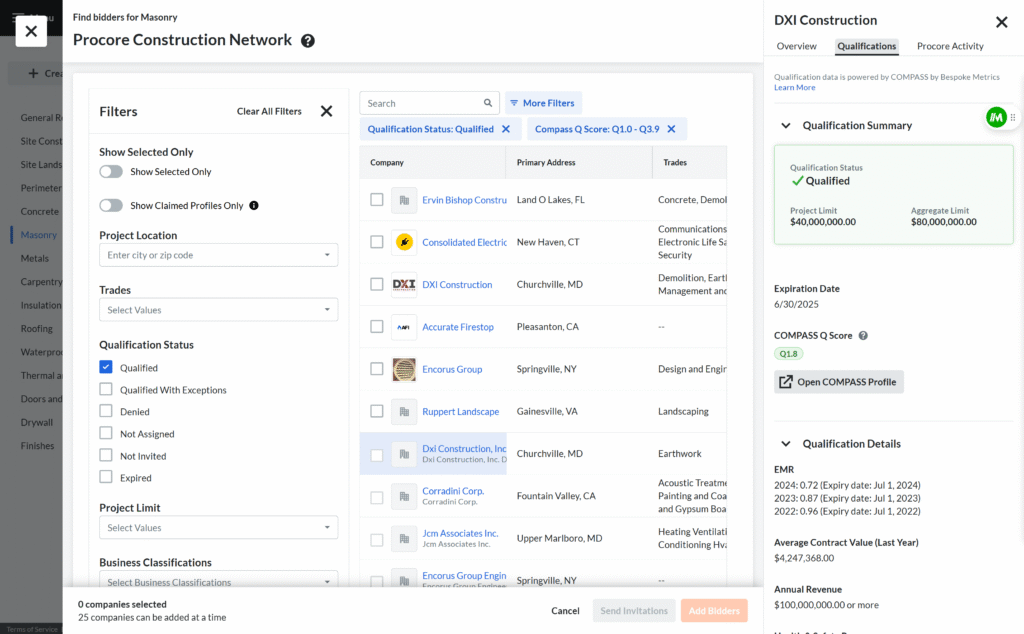
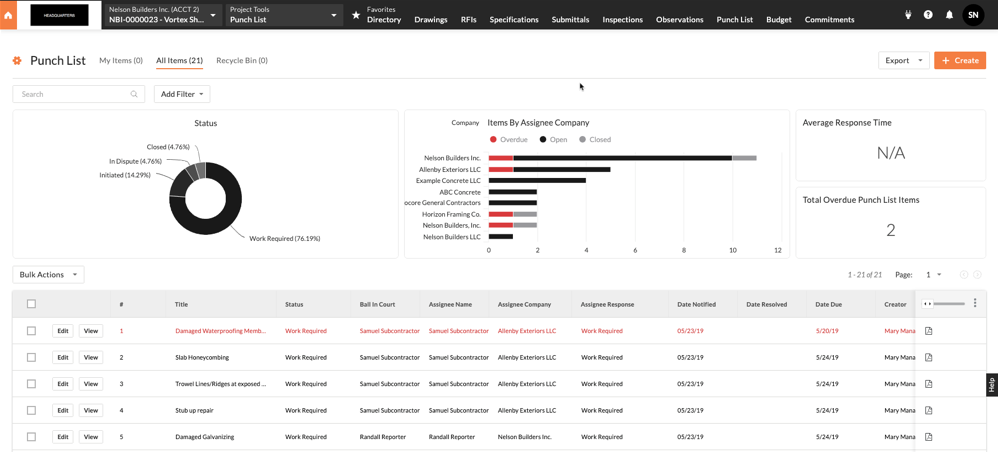
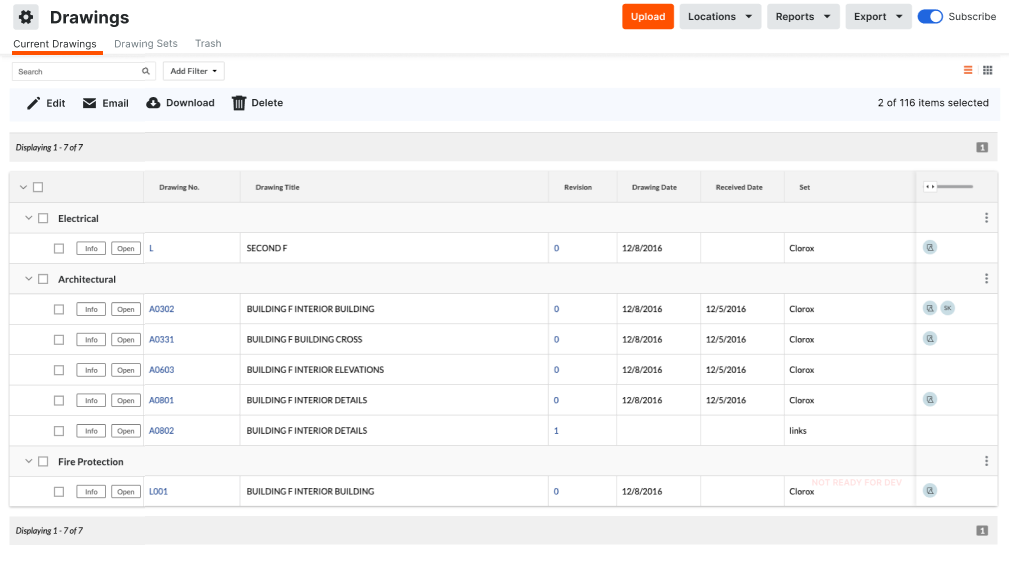
Procore offers much more than a slick interface, having one of the most complete feature sets of any tool we’ve reviewed. These features include tools for bidding, daily logs, drawings, emails, meetings, project photos, punch lists, RFIs, scheduling, project specifications, submittals, time cards, and transmittals. Procore has also expanded to offer takeoff, estimating, and bidding features that work seamlessly with its other products.
For the features that Procore doesn’t include, it offers one of the largest selections of third-party product integrations through the Procore Marketplace. Some popular integration partners include Sage 300 CRE, Sage 100 Contractor Connector, DocuSign, Microsoft Project, Primavera P6, Vista, Spectrum, and QuickBooks. Procore also offers its own native estimating tools following the acquisition of ProEst.
This video shows the latest version of Procore and it’s interface while highlighting some of it’s key use cases and features.
Procore utilizes a custom pricing model, meaning it does not publicly advertise fixed monthly rates. Instead, Procore’s pricing is tailored to each business and is primarily based on the Annual Construction Volume (ACV) run through the platform. This pricing scales according to the types of projects you manage, and additional modules or products included in your package will cost extra as well.
While you may not be able to get a firm price until you speak with the sales team, the majority of users find significant value in Procore’s platform. According to surveys of Procore customers, users save an average of 15 days on projects using Procore, and 90% of users agree that Procore helps improve their field-to-office communication. These efficiencies can save your business money and help make the investment in Procore worthwhile.
Finally, Procore also distinguishes itself with outstanding service. With a subscription to the product, Procore includes product training and ongoing support with an outstanding staff of representatives. Product reviews show high satisfaction with Procore’s customer service team.
Because of Procore’s extensive feature set, convenient integrations, and great reputation, it is our top recommendation, and we rate it the Best Overall Construction Project Management Software.
Buildertrend (Best for Home Builders & Remodelers)

Buildertrend was founded in 2006, and is now one of the most widely used construction project management tools. The company offers responsive customer service and maintains an A+ rating with the Better Business Bureau, although it is not a BBB-accredited business. In 2021, Buildertrend acquired its main competitor, CoConstruct, combining the two platforms into the undisputed leader for residential construction.
Pros
- Excellent features tailored specifically to home builders, remodelers, and their clients, including communication features and a client portal
- Pricing levels that are customized based on a firm’s annual construction volume
Cons
- Some customers complain of a steep learning curve
- Lacks some functionality that is important to commercial clients
Buildertrend is designed primarily for home building, remodeling, and specialty contracting, but it can also be used for commercial projects. Beyond just construction project management, Buildertrend includes features that span preconstruction, financial tracking and management, and customer relationship management.
Buildertrend’s cloud-based platform can be accessed via any device with a web browser and also through its iOS and Android apps. The same easy-to-navigate and clean interface is used on each of the Buildertrend products. Since the platform is online and app-based, the developers at Buildertrend constantly release updates and improvements, which all users receive instantly.
Buildertrend has a powerful suite of features addressing project management and much more. Their construction project management tools include daily logs to keep teams accountable, work-in-progress reports, to-do lists for creating and tracking action items, scheduling functionality, in-platform messaging, and other collaboration features that help with efficiency and meeting deadlines. Other features include document and photo storage, punch lists, and plan markup.
Buildertrend’s product covers a lot of needs, but it also offers a large suite of integrations for users who work with other technologies. Some popular software that Buildertrend connects with include:
- Clear Estimates for estimating
- Stack, eTakeoff, PrebuiltML, and PlanSwift for takeoff
- Quickbooks and Xero for accounting
- Several file-sharing and design tools
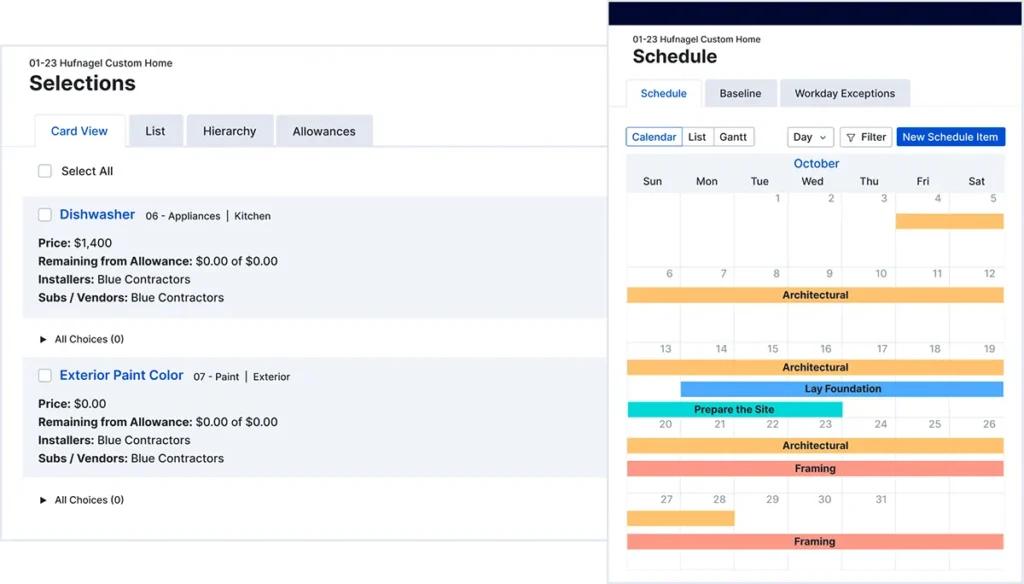
Buildertrend offers three primary service levels—Essential, Advanced, and Complete—with pricing offered via custom quotes tailored to a firm’s annual construction volume and specific feature needs. While the platform supports unlimited projects, user limits and total costs vary based on the specific quote and company size. The Essential tier includes key project management features like scheduling, daily logs, to-dos, communications tools, and a client portal with homeowner payments. The Advanced tier adds subcontractor payments, change orders, takeoff, estimating, bid management, and enhanced financial management. The Complete tier includes all of this functionality plus warranty management and the Selections tool.
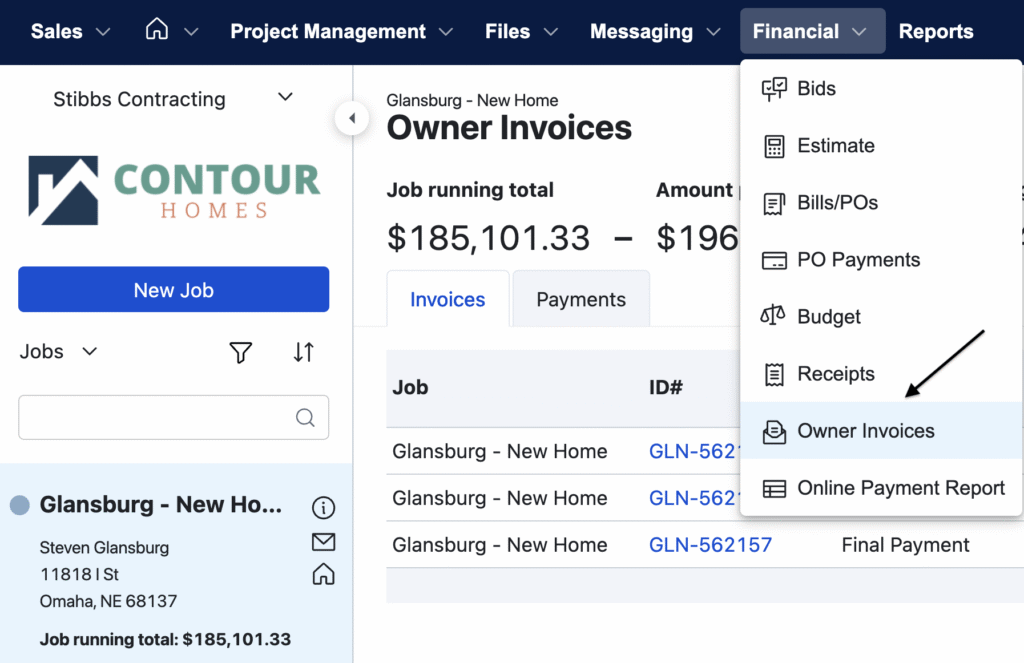
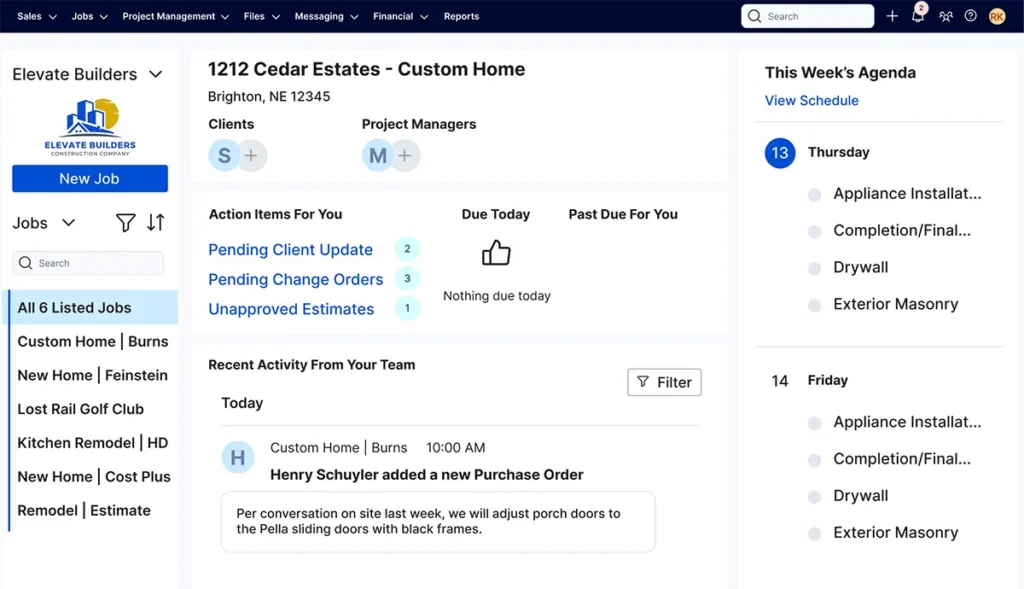

Buildertrend offers discounts for customers who pay annually. However, prospective users should be aware that the company does not offer a money-back guarantee; all subscription payments are non-refundable, and annual plans require a full-year commitment. It is recommended to participate in a software demo to ensure the platform fits your business needs before purchasing a license.
Buildertrend is an incredible product that was specifically designed with home builders and remodelers in mind. Because of this, we rate it the Best Construction Project Management Software for Home Builders & Remodelers.
Contractor Foreman (Best Value for Small to Midsize Contractors)
Contractor Foreman has built a strong reputation by delivering a robust set of project management tools at a price point that makes sense for growing contractors. Operating in a crowded market where software costs can quickly eat into profit margins, it provides an all-in-one platform without the enterprise-level price tag. The software is highly rated across user review sites and comes with a 100-day money-back guarantee for annual Plus, Pro, and Unlimited plans. This limits the upfront financial risk for growing firms transitioning off spreadsheets or older, fragmented software.
Pros
- Offers a comprehensive all-in-one platform at one of the most competitive price points in the industry, including over 35 modules without per-feature upcharges
- Provides an industry-leading 100-day money-back guarantee on annual plans, allowing users to test the software across multiple project cycles
Cons
- The dense interface and sheer volume of available tools can result in a steeper learning curve for new users
- While the platform is highly functional, some reporting and customization options are less advanced than those found in high-end enterprise systems
- The 100-day money-back guarantee does not apply to Basic or Standard plans, nor does it cover customers on quarterly billing cycles
Contractor Foreman is designed primarily for small to midsize trade and general contractors. Whether you run a specialized plumbing outfit or manage custom home builds, the platform is structured to centralize the operational needs of a growing business. It operates as a fully cloud-based system, meaning your estimating and project management data is accessible from any web browser in the office. For field operations, Contractor Foreman provides native mobile apps for both iOS and Android. This allows superintendents and foremen to submit daily logs, upload site photos, and clock in or out directly from the job site, ensuring the back office stays synced with field activities in real time.
The video below is a detailed demo of Contractor Foreman’s project management suite and highlights its clean interface and depth of features.
Contractor Foreman avoids piecemeal solutions by bundling major project management functions into a single platform. For the back office, estimating tools allow users to build detailed proposals, connect with cost databases, and push won bids directly into active project budgets. This eliminates the operational headache of re-keying data from an estimating spreadsheet into a separate financial tracking system. Once the project is underway, the software tracks job costing in real time, comparing estimated versus actual expenses so project managers can spot budget bleed before the job finishes.
On the operations side, the scheduling module utilizes standard Gantt charts and Critical Path Method (CPM) tracking. If a rain delay pushes a concrete pour back by three days, adjusting the schedule automatically shifts dependent tasks like framing and roofing. This keeps subcontractors aligned with the actual timeline and prevents trades from showing up to a site that isn’t ready for them.
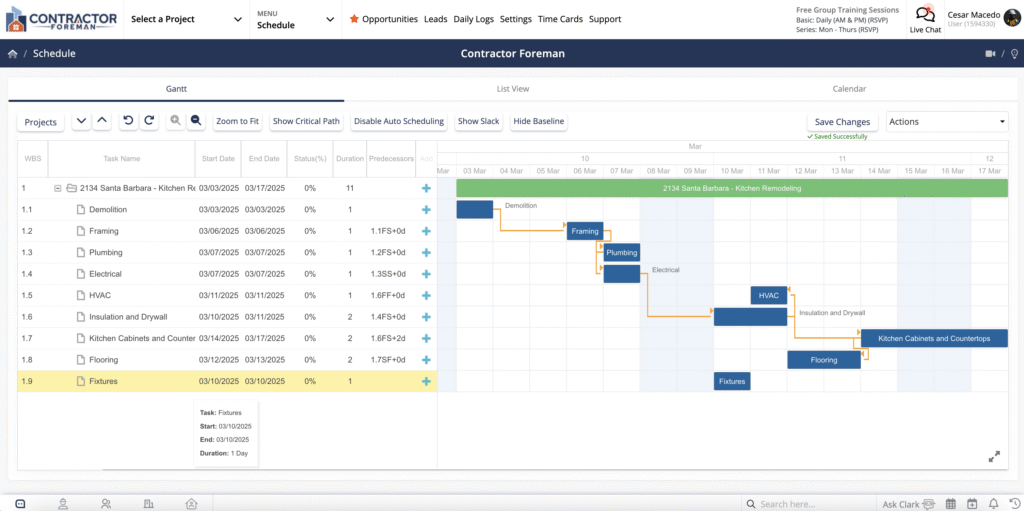
Field execution is managed heavily through daily logs. Foremen can use their mobile devices to record site conditions, labor hours, material deliveries, and progress photos. This creates a documented history of the job site. If a client disputes a delay or a subcontractor claims they were on site when they were not, the general contractor has a time-stamped, verifiable log to resolve the issue quickly and avoid costly payment disputes.
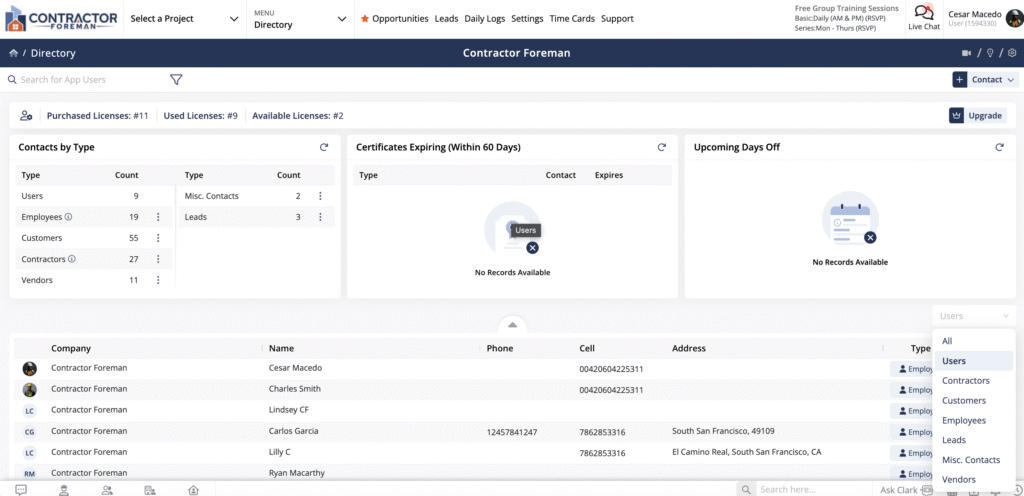
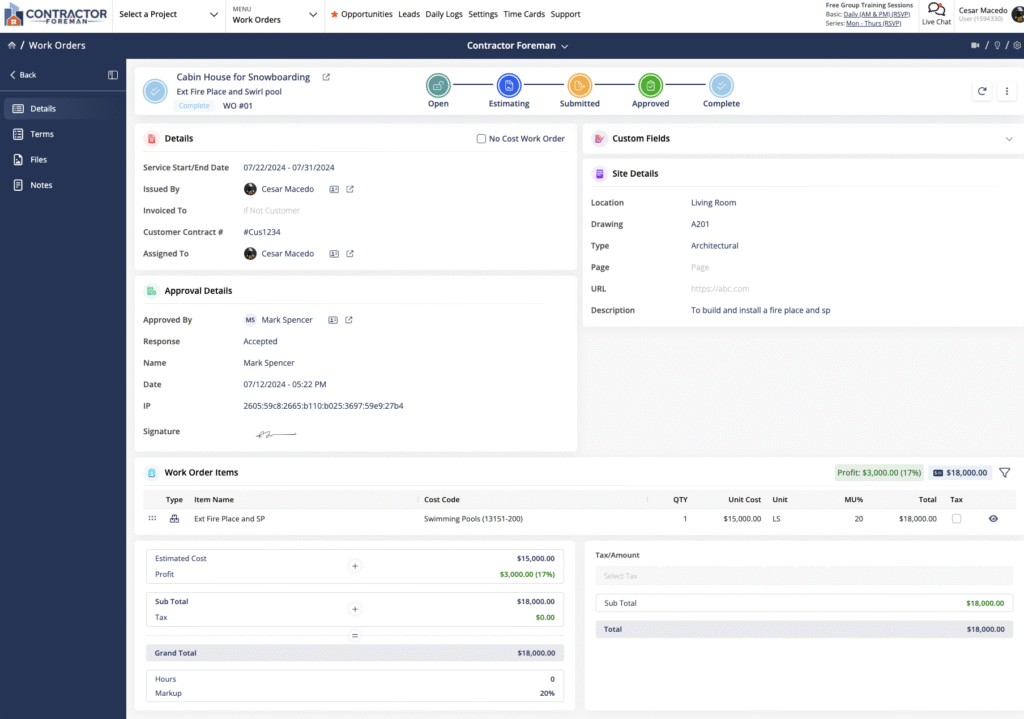
Contractor Foreman offers a practical approach to integrations, prioritizing the tools small and midsize contractors use most. The standout is its native, bidirectional sync with QuickBooks Online. Because financial data like expenses, invoices, and payments flow seamlessly between the two systems, your bookkeeper doesn’t have to manually re-enter data that the project manager already recorded, ensuring real-time financial accuracy. Beyond accounting, Contractor Foreman relies heavily on Zapier to connect with hundreds of other platforms, allowing contractors to link their project data with tools like Google Drive, Outlook, and various CRMs.
On the support and implementation side, Contractor Foreman is uniquely hands-on for a budget-friendly platform. Recognizing that the biggest hurdle for smaller contractors is software adoption, the company provides free onboarding and training for its mid-to-high tier plans. They also offer “Contractor University,” a built-in learning hub with role-based training paths. This means your lead estimator can take a specific course on bidding, while your field superintendent only sees training related to daily logs and mobile access. For daily issues, users have access to a standard ticketing system, email support, and an extensive knowledge base.
Unlike competitors that charge exorbitant per-user fees or scale costs aggressively based on construction volume, Contractor Foreman uses a highly transparent flat-rate tier system. Plans start at $49 per month for basic scheduling, daily logs, and time tracking for a small crew. As operations grow, companies can upgrade to the Plus, Pro, or Unlimited tiers, which cap out around $332 per month. The Unlimited tier removes user caps entirely and adds advanced features like GPS tracking, advanced reporting, and professional-grade financial management tools. Because the price does not increase with the number of projects you run, software overhead remains predictable as your business scales. The inclusion of a 100-day money-back guarantee for annual Plus, Pro, and Unlimited plans also allows firms to test the software through a full project cycle, provided they complete the initial training requirements.
Finding a project management system that bridges the gap between basic spreadsheets and costly enterprise software is a common challenge for growing construction businesses. Contractor Foreman solves this by packing estimating, scheduling, job costing, and field management into an affordable, unified platform. Because of its transparent pricing, extensive feature set, and lack of per-project fees, we rate Contractor Foreman as the Best Value for Small to Midsize Contractors.
Autodesk Forma (Best for Large Projects & Teams)
Autodesk operates one of the most widely used software ecosystems in the construction and design industries. In early 2026, Autodesk Construction Cloud (ACC) was officially integrated into Autodesk Forma, merging its construction management tools into a broader cloud environment that spans planning, design, execution, and operations. While the branding has changed—with modules like Autodesk Build transitioning to Forma Build—the underlying infrastructure remains a massive, enterprise-grade system.
Pros
- Deep integration with design tools like Revit and AutoCAD eliminates data silos between architects and contractors
- Forma Data Management provides an unmatched common data environment for handling massive document sets
- Highly customizable module selection allows enterprise firms to build out exactly the tech stack they need
Cons
- Constant rebranding and legacy software transitions make the Autodesk ecosystem confusing to navigate
- PlanGrid users are effectively forced to migrate, as the legacy app is in maintenance mode and no longer receiving updates
- Pricing scales aggressively based on sheet counts and the number of modules activated
For years, field teams relied heavily on PlanGrid for mobile blueprint viewing. However, Autodesk has sunset PlanGrid, placing it in maintenance mode with no future development. Users are now pushed toward Forma Build, which serves as the active, modern replacement. Forma Build absorbs the core document management strengths of PlanGrid but scales them up with comprehensive project management features, including cost management, RFIs, submittals, and safety inspections.
Forma Build is a heavy-duty platform. It is designed to handle the complexity of large commercial, institutional, and infrastructure projects where hundreds of stakeholders need access to the same centralized data. Because it connects directly with the design phase, project managers can track a design change from the architect’s desk straight through to the superintendent’s tablet on the job site.
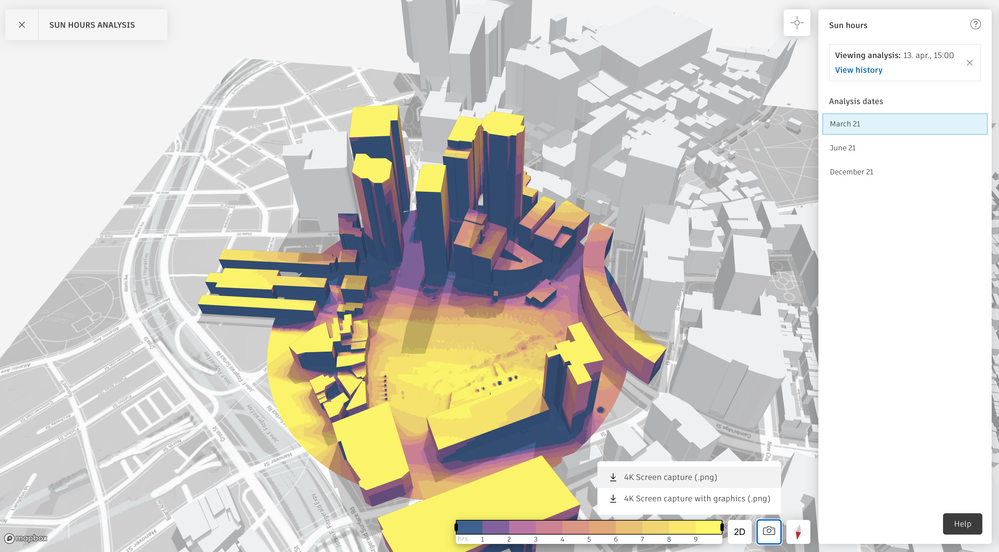
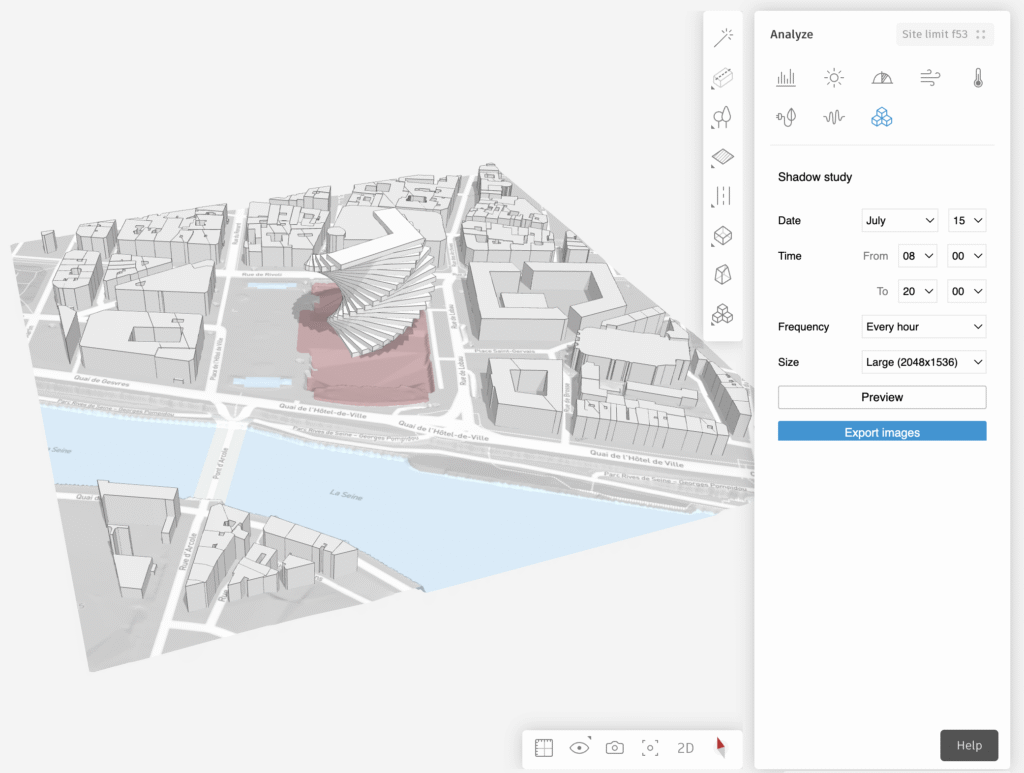
Despite the comprehensive functionality and the shift to the Forma ecosystem, the software maintains the user-based, sheet-count pricing model established under ACC. Subscriptions are tiered based on the number of sheets a user needs to access. The base tier, which covers up to 550 sheets, typically starts around $470 to $500 per user, per year. For larger projects, the 5,000-sheet limit costs roughly $830 to $910 per user, per year. Finally, unlimited sheet access runs between $1,550 and $1,625 per user, per year.
Because Autodesk is modular, specialized tools come with their own price tags. While foundational document management is included in the base platform, standalone access to Forma Data Management (formerly Docs) starts at $500 per year, and the Forma Takeoff module runs around $1,250 to $1,290 per user, per year. When fully loaded at the highest tiers, the costs represent a significant investment, reinforcing that this platform is built for companies managing massive construction volume rather than small, local projects.
Because of its deep integration with industry-standard design tools, massive scalability, and powerful data management, Autodesk Forma remains our top choice as the Best Construction Management Software for Large Projects and Teams.
RedTeam Go (Best for Small Businesses)

RedTeam Go is an affordable, online project management solution designed for small-to-midsize general contractors. While it may not offer the extensive functionality found in RedTeam’s enterprise-level software, RedTeam Flex, it still provides a robust set of features. In fact, it is among the most feature-rich and cost-effective options available for construction project management.
Pros
- An excellent choice to manage projects for small-to-midsize firms
- An all-inclusive flat rate pricing model that is more affordable than many competing products
Cons
- The submittal process is a bit cumbersome
- Reporting features are not as advanced as those found on other products
- The mobile app could be updated with more features
RedTeam Go is designed to help construction professionals throughout the entire construction process, from bidding and project planning to closeout. This includes all of the features that most small contractors need to bid, build, track, and collaborate from the job site and in the office. As a web-based solution, RedTeam Go is accessible from any device with an internet connection. It also comes with a mobile app that allows contractors and subcontractors to update job progress, upload photos, and access project information remotely from the job site. The platform’s user experience is exceptionally smooth, featuring an intuitive workflow and a clean, modern design that creates a pleasing user experience. The included screenshots provide an excellent preview of the platform’s interface.
This demo video from RedTeam runs through the full scope of RedTeam Go’s features by showing exactly how to manage a construction project with the software:
While QuickBooks remains a core integration for construction accounting, RedTeam Go now supports additional platforms such as Sage and Foundation Software. Customers seeking integration with Acumatica or DocuSign should consider RedTeam’s enterprise-level construction management solution, RedTeam Flex.
As a company, RedTeam excels in customer support, with a dedicated team of experts who assist companies in implementing the software for the first time. The company also provides a wealth of free training and educational resources for new users. In case of any questions, team members can contact RedTeam’s support staff through chat or email, or they can refer to the online help center. Compared to larger players in the market, such as Procore or Sage, RedTeam is known for providing a more personalized touch when it comes to customer support, as noted by many reviewers.
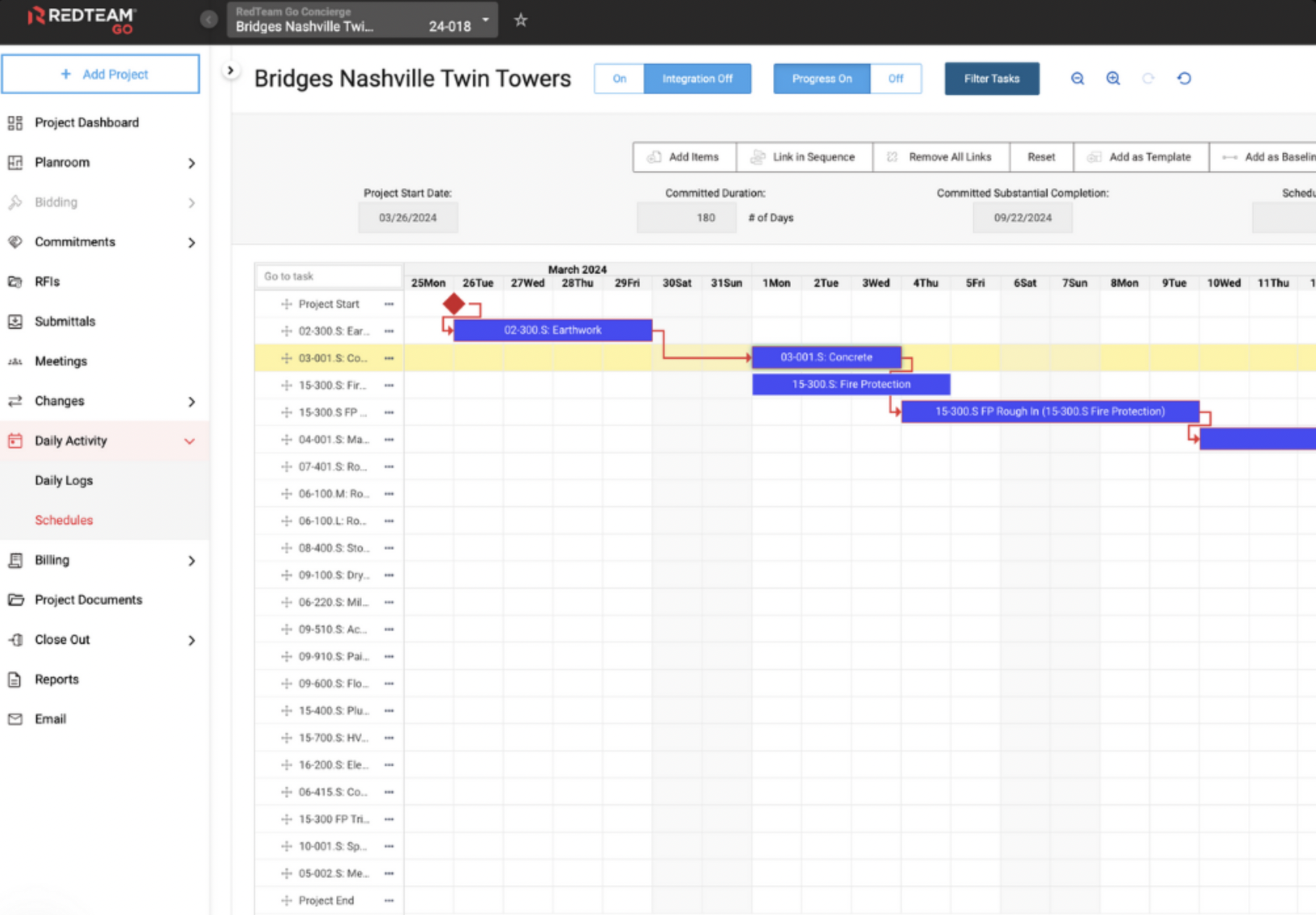
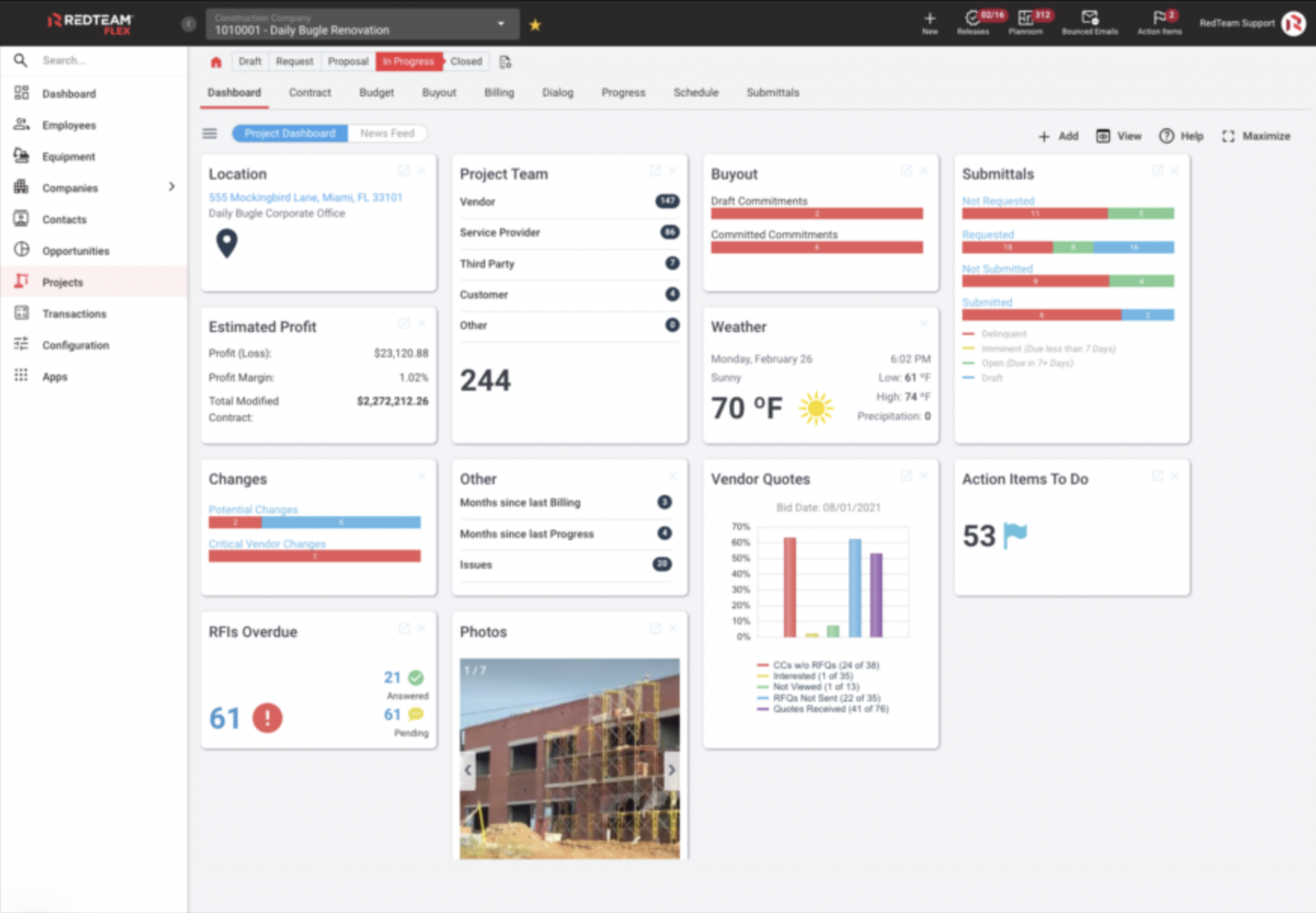
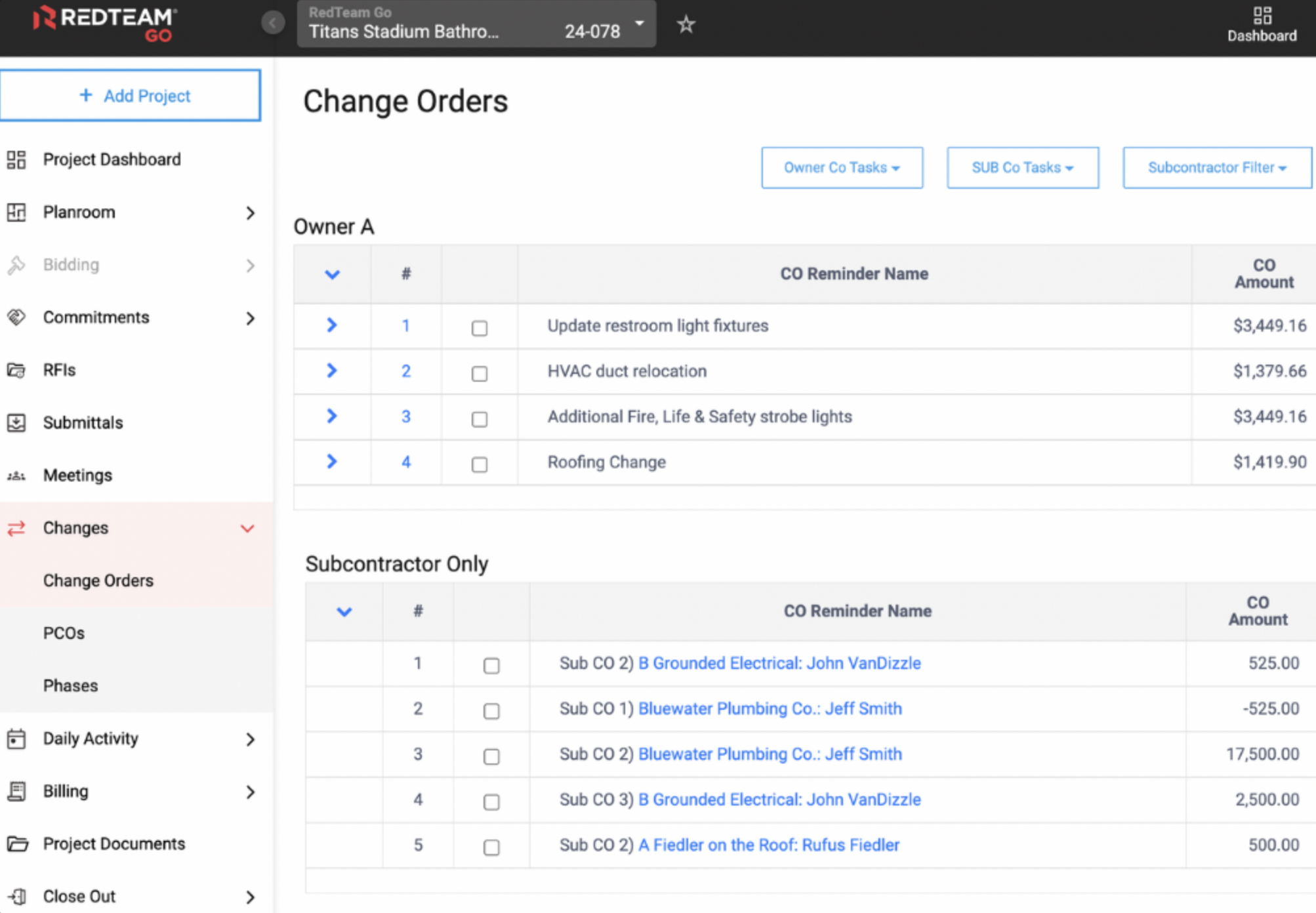
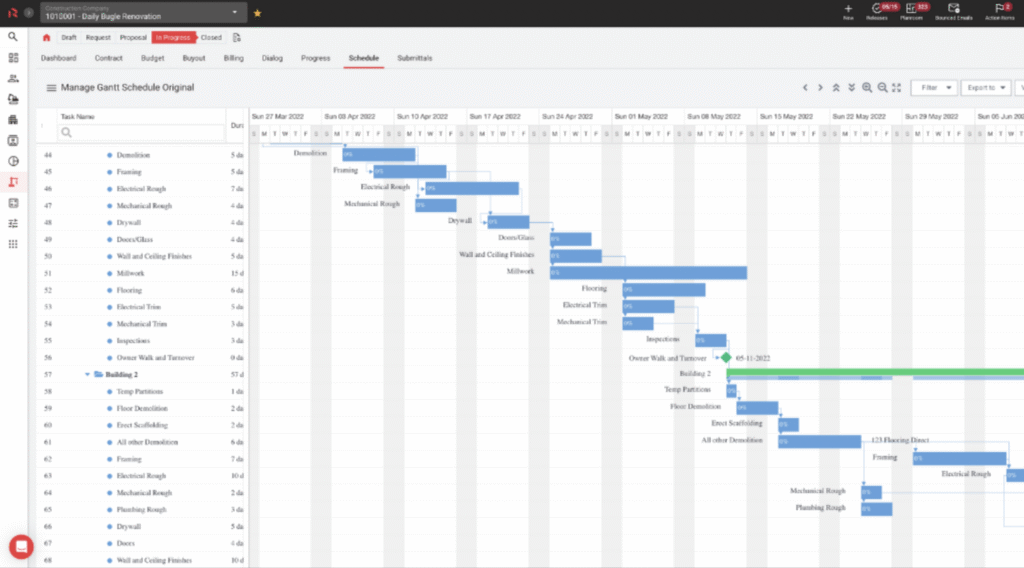
RedTeam Go offers a no-cost ‘Benchmark’ subscription level for basic estimating and proposals with unlimited users and projects. The Bidding subscription package starts at an affordable $199 per month (or $165 per month when paid annually). However, those seeking a comprehensive end-to-end construction management solution should opt for the higher-priced Complete package, which starts at approximately $875 per month or $10,000 per year.
The Complete subscription includes RedTeam’s full suite of project management features, providing excellent value for money, considering its numerous time-saving capabilities. Unlike some competitors, RedTeam offers an all-inclusive pricing model, meaning that customers pay a single price for unlimited users and access to all of RedTeam’s features, without needing to pay for additional modules.
While RedTeam Go is feature-rich and should meet the needs of most small-to-midsize contractors, RedTeam’s enterprise-level solution, RedTeam Flex, is specifically designed for larger firms. RedTeam Flex starts at approximately $10,000 annually, with the final cost determined by the active project volume (APV), which is the aggregate value of in-progress projects managed on the platform.
RedTeam Go stands out as a top-performing construction project management tool that offers excellent value for its cost. This web-based product is accessible on any internet-enabled device, and its mobile app streamlines updating project details from the field compared to non-web-based solutions. Additionally, RedTeam’s pricing structure is transparent and affordable, and the company’s commitment to delivering exceptional customer service further sets it apart from other full-featured construction management software providers. Considering these exceptional features, we confidently endorse RedTeam Go as the Best Construction Management Software for Small Businesses.
Fieldwire (Best for Field Teams and Superintendents)
Fieldwire, now backed by Hilti, has carved out a distinct space in the construction software market by focusing relentlessly on the people actually building the project. While massive platforms try to be everything to everyone—spanning from accounting to preconstruction—Fieldwire is arguably the best mobile-first application built specifically for foremen, superintendents, and specialty contractors walking the job site. It serves as a direct, highly capable competitor to Procore’s field productivity module, delivering enterprise-grade plan viewing and task management at a fraction of the cost.
Pros
- Highly responsive blueprint rendering on mobile devices and tablets, complete with reliable offline access
- Task-based kanban boards make assigning, locating, and tracking subcontractor work visual and intuitive
- Transparent pricing allows field teams to access premium execution tools without carrying the overhead of a full management suite
Cons
- Lacks the deep financial, estimating, and preconstruction features found in comprehensive all-in-one platforms
- Advanced scheduling capabilities are limited compared to dedicated critical path method (CPM) software
Fieldwire is built for the individuals directing work in the dirt and on the deck. While project managers in the home office use the web interface to track overall progress, the platform is primarily geared toward superintendents, foremen, and specialty trades. It is designed to bridge the gap between the job trailer and the active site, ensuring the crews performing the labor are operating off the most current information without carrying a roll of paper drawings.
Unlike legacy software that simply forces a desktop view onto a smaller screen, Fieldwire is a true mobile-first application. The iOS and Android apps are engineered for the physical realities of construction environments. Because cell service is notoriously unreliable inside concrete elevator cores or underground parking structures, the app relies heavily on offline functionality. A foreman can pull up a full set of structural drawings, drop a pin on a specific column, and assign a task to a subcontractor with zero bars of service. The moment the device reconnects to Wi-Fi or cellular data, the system automatically syncs those updates back to the broader team.
The bedrock of Fieldwire is its drawing management. For field teams, the speed at which a blueprint renders on a tablet is an operational bottleneck. Fieldwire’s viewer processes HD blueprints quickly without the lag or pixelation common in heavier project management platforms. It automatically reads sheet titles via optical character recognition (OCR), auto-hyperlinks detail callouts, and tracks version control seamlessly. When the architect issues a revised drawing, the old sheet is watermarked as void, ensuring no one in the field builds off an outdated plan.
Instead of relying on spreadsheets or endless email chains to track subcontractor progress, Fieldwire uses task-based kanban boards. A superintendent can walk the site, take a photo of a framing issue, drop a pin on the exact location on the digital floor plan, and assign it as a task to the framing contractor. That task enters the kanban board, where it moves visually from “Open” to “In Progress” to “Verified.” This visual workflow makes it immediately obvious which trades are holding up the schedule and which areas of the job site are ready for the next phase of work.
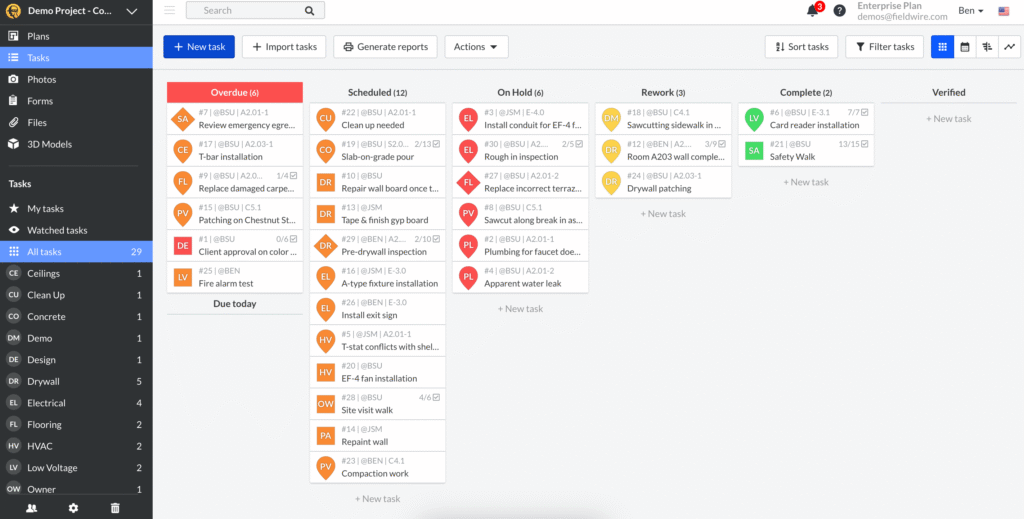
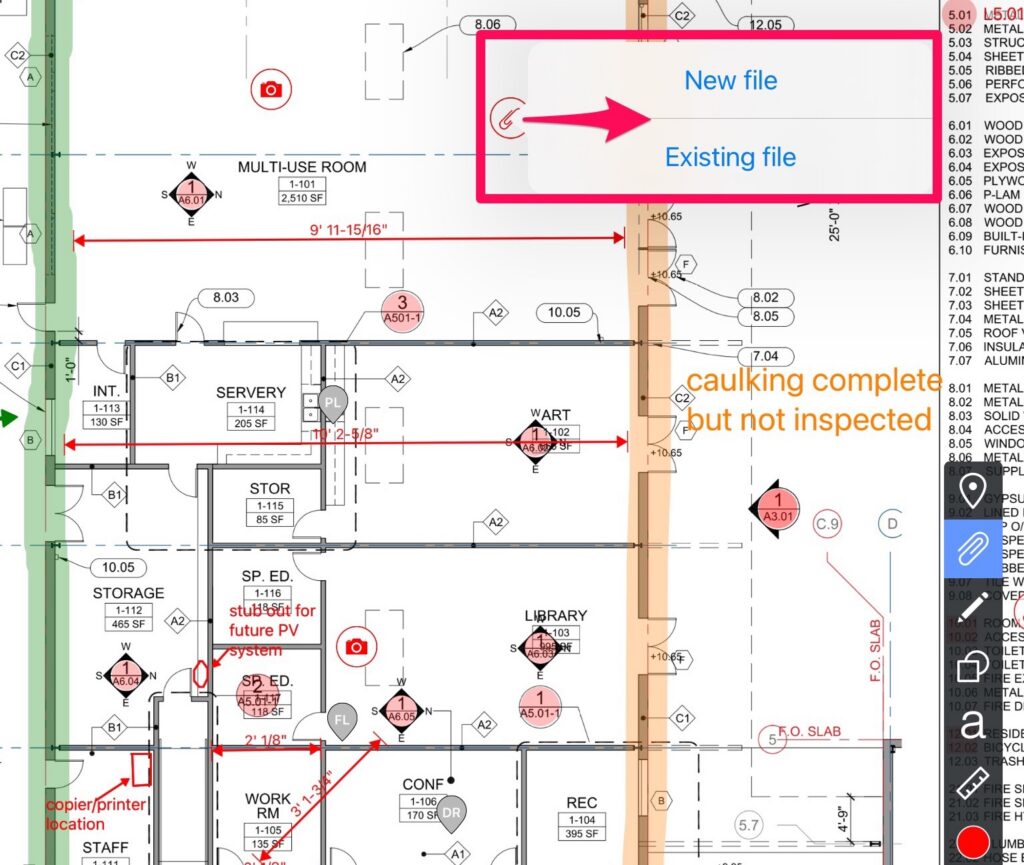
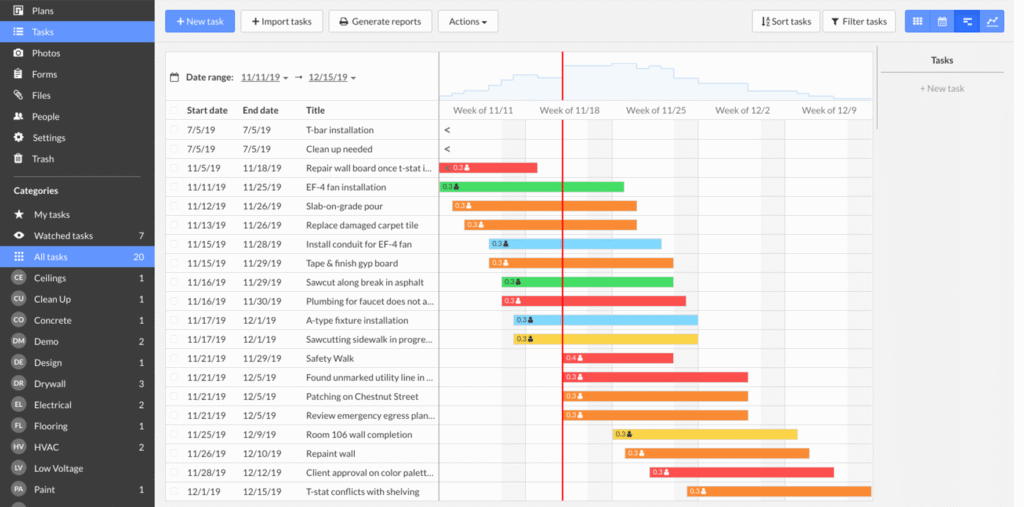
This task framework translates directly into one of the most efficient punch list tools on the market. Because every snag or defect is tied directly to a specific location on the blueprint and categorized by trade, generating a punch list report takes seconds rather than hours. Subcontractors receive an automated PDF or CSV report detailing exactly what they need to fix, complete with photos and locations, massively accelerating the project closeout process.
Because Fieldwire centers around document control and field execution, its integrations lean heavily into file management rather than comprehensive financial syncing. The platform offers direct, two-way syncs with major cloud storage providers like Box, Dropbox, and Microsoft OneDrive. This ensures that when the design team updates a plan set in the corporate Dropbox folder, that sheet automatically pushes to Fieldwire without the project engineer having to manually upload the new version. The software also provides an open API for enterprise-level users, allowing contractors to pull task and workforce data into tools like Smartsheet or Power BI for cross-project analytics.
From a support standpoint, Fieldwire uses a tiered approach. Basic and Pro users have access to a comprehensive knowledge base and email support, while Business tiers unlock priority phone support. For organizations requiring a higher level of service, Fieldwire also offers Enterprise contracts that include dedicated account managers and customized training programs. Given the intuitive, mobile-first interface, most field workers can pick up the application with minimal training. However, Fieldwire still provides extensive onboarding resources and account-level templates to help companies standardize their task management and forms across multiple job sites.
Fieldwire utilizes a straightforward, per-user pricing model that scales predictably as you add headcount. Unlike many enterprise systems that hide their pricing behind sales calls, Fieldwire is completely transparent. They offer a basic free tier (capped at five users, three projects, and 100 sheets) for small crews or single-project trials, allowing teams to test the software before committing.
For paid tiers, the Pro plan runs $54 per user on a month-to-month basis, or drops to $39 per user per month when billed annually. The Business plan, which unlocks custom forms, 360-degree photos, and two-way storage syncing, costs $79 per user monthly ($64 per user per month annually). Finally, the Business Plus tier—which adds advanced project management and budgeting features like RFIs, change orders, and submittals—runs $104 per user monthly ($89 per user per month annually). This structure makes it highly cost-effective for general contractors who want to equip their superintendents and key trade foremen with premium execution tools, entirely avoiding the massive, volume-based contracts associated with comprehensive platforms like Procore.
For contractors looking to streamline job site operations without forcing their field teams to navigate a bloated, overly complex system, Fieldwire is the clear answer. Its unmatched blueprint rendering speeds, intuitive kanban task tracking, and reliable offline functionality keep the focus exactly where it belongs: on building the project. Because it delivers top-tier field productivity at an accessible price point, we rate Fieldwire as the Best for Field Teams and Superintendents.
Sage Intacct (Best for Large Enterprises)

For decades, large contractors relied on Sage 300 Construction and Real Estate (formerly Timberline) to run their operations. However, the software landscape has fundamentally changed, and Sage has shifted its enterprise focus to Sage Intacct Construction. While Sage 300 CRE remains an actively updated core product for firms that prefer on-premise stability, Intacct serves as its modern, cloud-native counterpart. It replaces the heavy, on-premise servers of the past with a highly scalable ERP designed specifically to handle complex construction financials, multi-entity consolidation, and modern API integrations.
Pros
- True cloud-native architecture eliminates the need for expensive on-premise servers, remote desktops, and VPNs
- A multi-dimensional general ledger allows for incredibly granular financial reporting across multiple entities, jobs, and cost codes
- Modern APIs make integrating with leading field execution and project management tools much easier than legacy systems
Cons
- The data migration from Sage 300 CRE to Intacct is notoriously difficult, requiring significant data cleanup and process changes
- While it is known as a financial powerhouse, users can now leverage native Sage Construction Management and Work Order tools for project tracking, though many firms still prefer third-party integrations for specialized field operations
- The system’s highly structured accounting workflows can temporarily frustrate teams who are used to the older software
Sage Intacct Construction is built for large commercial contractors, heavy civil firms, and multi-entity developers. Because it is fully cloud-based, accounting teams and executives can access real-time financial data from any web browser. This is a massive operational upgrade from Sage 300 CRE, which typically required field teams to use clunky remote desktop setups just to check a budget or submit a purchase order.
At its core, Intacct is a financial powerhouse. Instead of relying on a massive chart of accounts with thousands of hard-coded combinations, Intacct uses “dimensions.” This means an accountant can tag a single transaction with the specific project, vendor, cost code, and entity. When executives need a report showing the profitability of all concrete work across three different subsidiary companies, Intacct can generate that dashboard instantly. It also handles industry-specific complexities out of the box, including AIA billing, retainage tracking, and compliance management.
While Intacct now offers native project management and work order modules, its modern architecture is a massive improvement over older Sage products and prioritizes flexibility through integrations. Intacct connects seamlessly with industry-standard tools like Procore or Ingenious.build for project management, Fieldwire for field execution, and hh2 for payroll tracking. This allows the field to use the best execution tools available while keeping the back office’s financial truth perfectly synced.
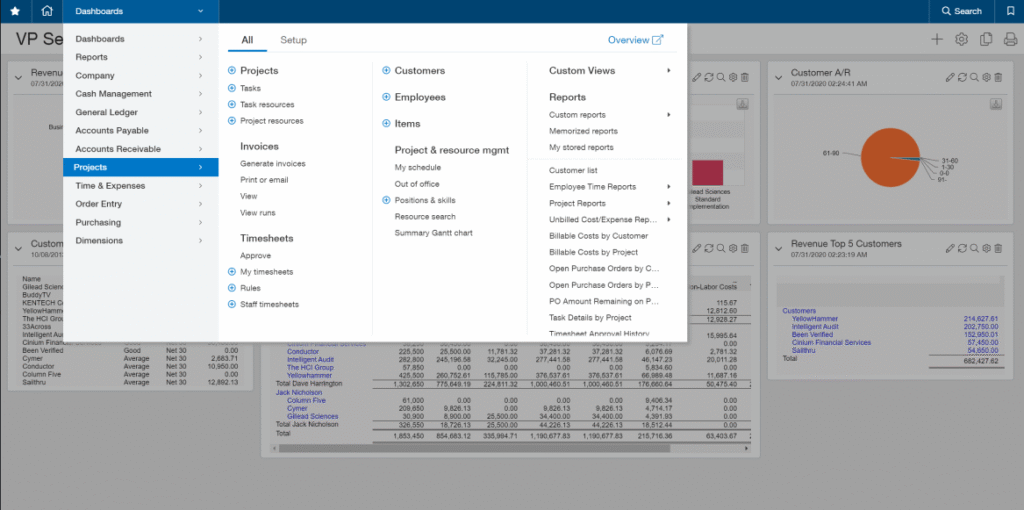
Pricing for Sage Intacct uses a modern subscription model, which eliminates the server-based infrastructure costs and annual maintenance fees historically associated with Sage 300 CRE. Costs scale based on the number of users, entities, and specific modules required. However, prospective buyers should budget heavily for implementation. Transitioning to Intacct—especially migrating historical data from an older legacy system—often requires the help of specialized third-party consultants to ensure a clean cutover.
For companies outgrowing basic accounting tools or looking to modernize from legacy on-premise servers, Sage Intacct Construction provides an unmatched financial foundation. Because of its deep scalability and reporting power, we rate it the Best Construction Software for Large Enterprises.
JobTread (Best Value for Residential Contractors & Remodelers)

JobTread has rapidly gained market share among residential contractors and remodelers by offering a modern, highly customizable platform without the bloat of older legacy systems. Positioned as a direct, more affordable alternative to heavyweights like Buildertrend, it centralizes sales, estimating, and project management workflows. The platform is designed to keep software overhead low while providing the operational depth required to manage custom builds or high-volume residential remodels simultaneously.
Pros
- Deep, bidirectional integration with QuickBooks Online and Desktop
- A more affordable and transparent price point for small- and medium-sized businesses
Cons
- The highly customizable interface can have a steeper learning curve for some users
- Per-user pricing fees can add up quickly for companies with very large internal teams
JobTread is built specifically for custom home builders, remodelers, and specialty residential trades. It bridges the gap between the back office and the job site using a fully cloud-based architecture. Estimators and project managers can manage bids, change orders, and financials from any web browser on a desktop or laptop.
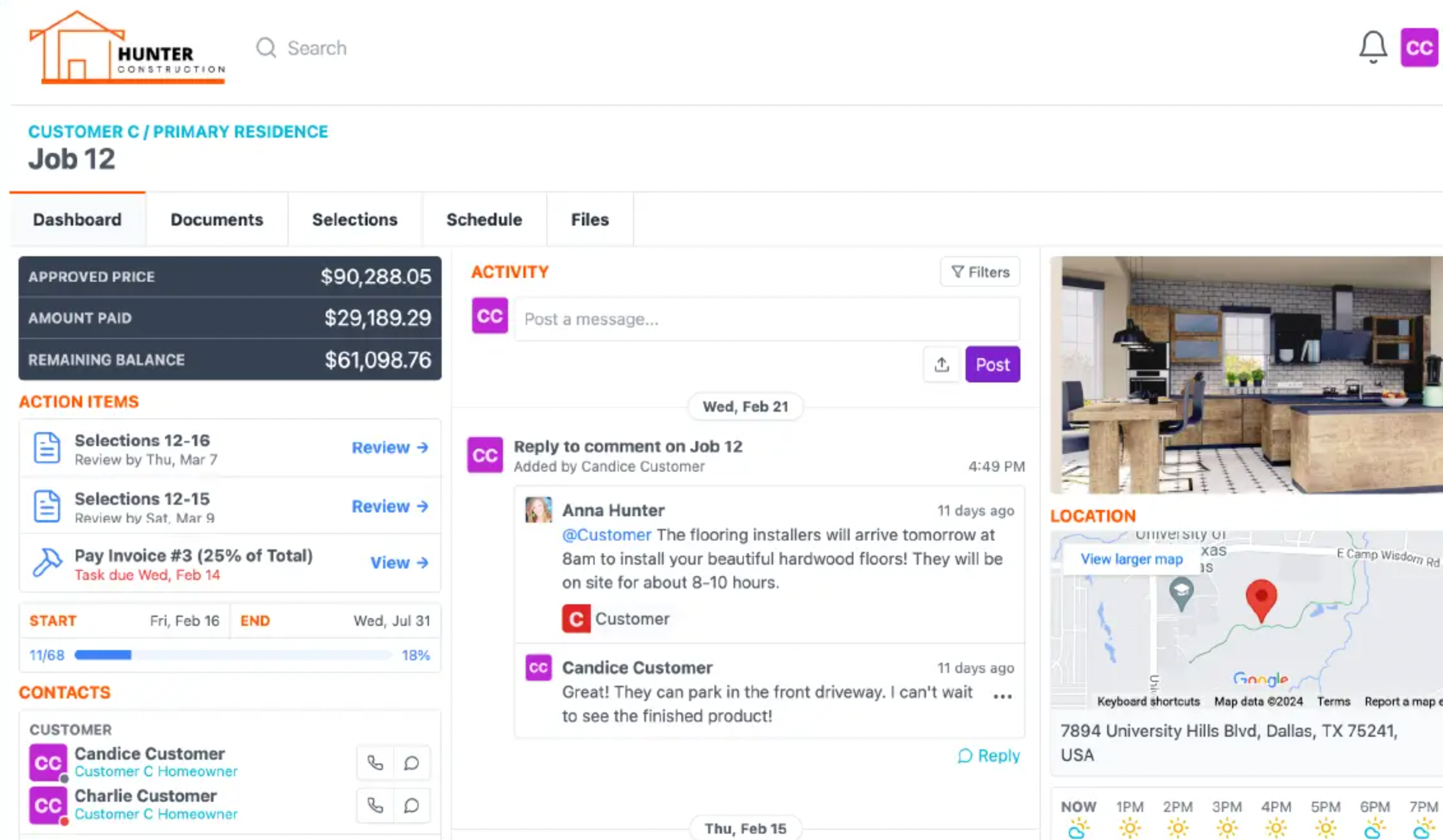
For the field, JobTread provides a robust web app compatible with both iOS and Android. This allows superintendents and crew members to clock in, view daily schedules, upload site photos, and access project documents directly from their phones. Because the platform updates in real time, the office always has an accurate picture of what is happening on site without having to track down foremen for manual status updates.
JobTread’s core strength lies in its tightly integrated estimating and job costing workflows. For residential contractors, building an accurate estimate is often the bottleneck that slows down the sales process. JobTread addresses this with a highly customizable cost catalog and budgeting templates. Estimators can present clients with “good, better, best” options directly within a professional proposal, allowing homeowners to easily select material upgrades. Once the client approves the bid via e-signature, that estimate instantly converts into the live project budget without requiring manual data entry.
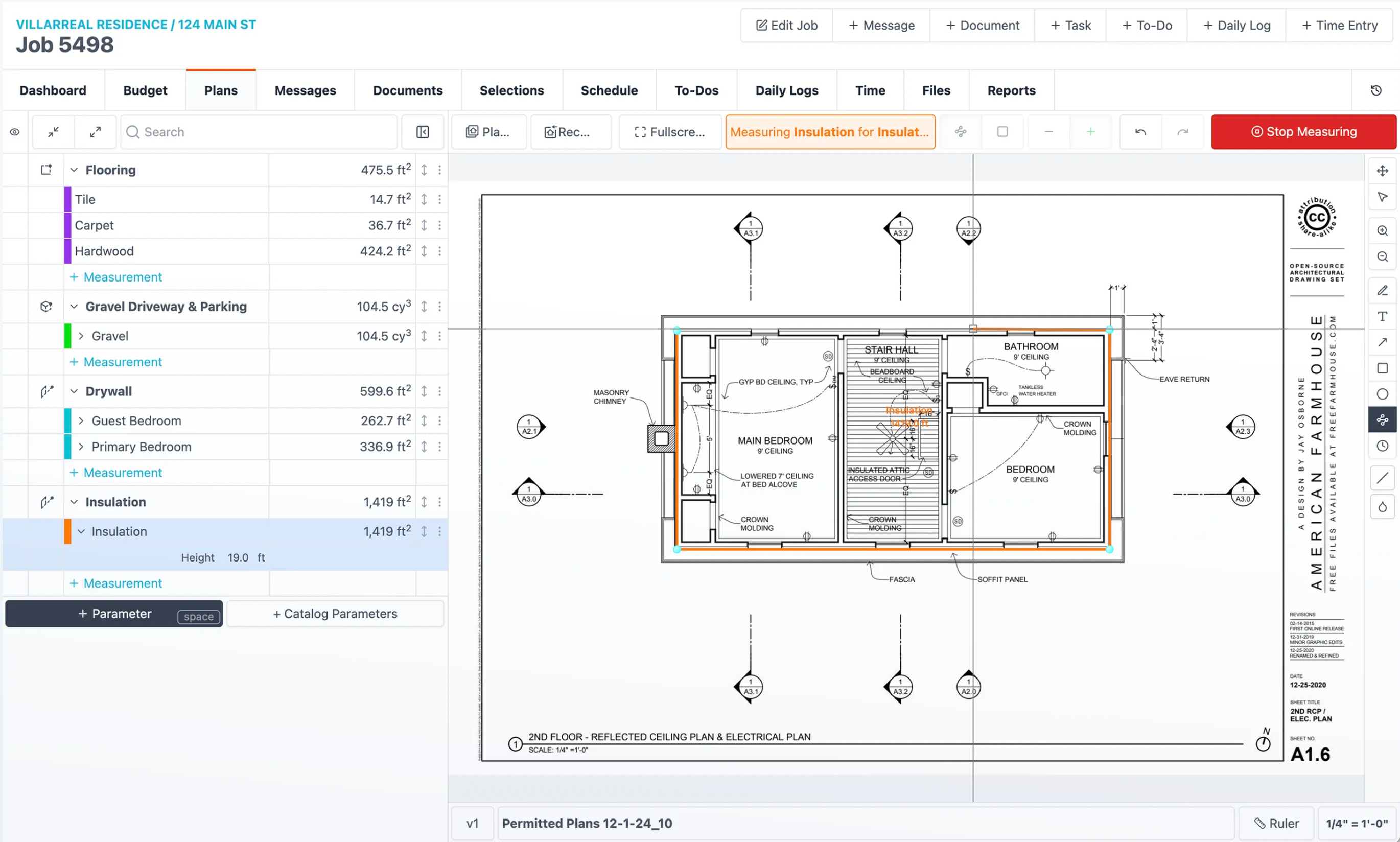
Once the build is active, JobTread excels at real-time job costing. As purchase orders are issued and labor hours are logged from the field, the software tracks actual costs against the estimated budget line by line. This prevents the common scenario where a remodeler only realizes they lost money on the framing phase after the entire job is finished. If a client requests a mid-project change—like swapping standard countertops for quartz—contractors can quickly generate a change order, get digital approval through the client portal, and ensure the new costs and profit margins are protected.
For project timelines, JobTread provides standard Gantt chart scheduling. While it may not have the highly advanced critical path logic of heavy commercial software, it provides the dependency tracking a residential builder needs to keep specialty trades aligned. This schedule, along with daily logs, site photos, and invoices, can be shared through dedicated customer and vendor portals. For a custom home builder, this transparency drastically reduces the number of update phone calls a project manager has to field from anxious homeowners.
JobTread understands that residential contractors often rely heavily on a few core tools rather than needing a massive, enterprise-scale IT environment. Its most critical integration is a deep, bidirectional sync with QuickBooks (both Online and Desktop). This ensures that invoices, payments, and expenses flow seamlessly between the project management platform and the accounting software, eliminating double data entry for bookkeepers and keeping job costs completely accurate. Beyond accounting, JobTread provides an open API and natively connects with Zapier, allowing contractors to easily link their project data to CRMs like HubSpot or file storage systems like Google Drive.
From an implementation standpoint, JobTread has built a reputation for having some of the strongest customer support in the residential software space. Recognizing that switching software can paralyze a small business, JobTread pairs new customers with a dedicated Customer Success Specialist. This onboarding team actively helps contractors build out their cost codes, import their material catalogs, and set up their budget templates before the system goes live. For ongoing support, users have direct access to their representative via phone, email, or text, bypassing the frustrating automated ticket systems used by many larger competitors.
JobTread takes a radically transparent approach to pricing, avoiding the complex, multi-tiered feature packages that force contractors to overpay just to unlock a specific tool. Every customer gets access to the exact same feature set from day one.
The cost is entirely headcount-based. On a month-to-month plan, the software costs $199 per month for the first internal user, plus $20 for each additional user. If billed annually, the base rate drops to $159 per month, with additional users costing $18 each. Importantly, JobTread only charges for internal employees. You can invite an unlimited number of subcontractors, vendors, and clients into their respective portals absolutely free. This structure makes JobTread highly affordable for smaller outfits, though the per-user fees can start to compound if you employ a massive internal administrative and field staff.
Finding a middle ground between basic spreadsheets and bloated enterprise software is a major challenge for residential builders. JobTread fills this gap by delivering top-tier estimating, real-time job costing, and highly reliable field management tools without locking essential features behind expensive paywalls. Because of its transparent pricing, immediate operational impact, and outstanding customer support, we rate JobTread as the Best Value for Residential Contractors & Remodelers.
Sage 100 Contractor (Best On-Premise Solution)
Sage 100 Contractor—formerly known as Sage Master Builder—is one of three primary construction management solutions that Sage offers. Unlike Sage 300 CRE and the cloud-native Sage Intacct Construction, which are generally targeted toward larger operations, Sage 100 Contractor is purpose-built for small-to-midsize contractors and construction companies. Still, Sage 100 Contractor offers a similarly comprehensive set of tools to manage construction businesses. Sage 100 Contractor’s key features include accounting, project management, estimating, and field service management.
Pros
- Integration with other Sage products, including estimating and accounting
- A more affordable price point for small- and medium-sized businesses
Cons
- Not a cloud-based solution, which limits the functionality compared to cloud-based competitors
- Some customers complain about having to hire third-party consultants to solve issues with the software
Sage 100 Contractor is primarily an on-premise solution, traditionally requiring installation on a dedicated server and distribution to licensed workstations. However, it can also be deployed through various cloud-hosting options—such as Sage 100 Contractor Cloud—which allow employees to access the system remotely without the need for maintaining an in-house server room. Installations currently require a 64-bit Windows operating system, specifically Windows 11 or a modern Windows Server environment, as Sage has discontinued support for Windows 10 and 32-bit systems in its latest releases. However, some Sage modules have cloud-based or mobile apps associated with them for field use. While an installation may seem complicated, Sage has a network of vendors who can install the software for you and train employees on how to use the tool.
Sage 100 Contractor’s project management features improve visibility for project managers with exceptional dashboards and reporting features. Sage 100 Contractor uses data from other modules like estimating, accounting, and service management to automatically get started with projects and keep them up to date and on track. Document storage and communications tools like email alerts make it easy to find important information quickly and respond to issues as they arise.
Beyond its project management capabilities, Sage 100 Contractor is a complete product, spanning the entire construction project workflow, which allows managers to keep a close watch on the business using a single software solution. Sage offers other essential features, including accounts payable and receivable tracking, general ledger, inventory management, service management, job costing, estimating, purchasing, and invoicing. Like Sage 300, the software is modular, so features can be included or excluded based on user needs.
Sage’s interface is a bit outdated compared to other products on this list, including Sage 300. However, even though the look is less modern, it is still a very intuitive and powerful tool. The arrangement is logical, and it is easy to find the information you need. Check out these screenshots of the platform to get a good sense of the modular setup and logical workflow Sage offers:
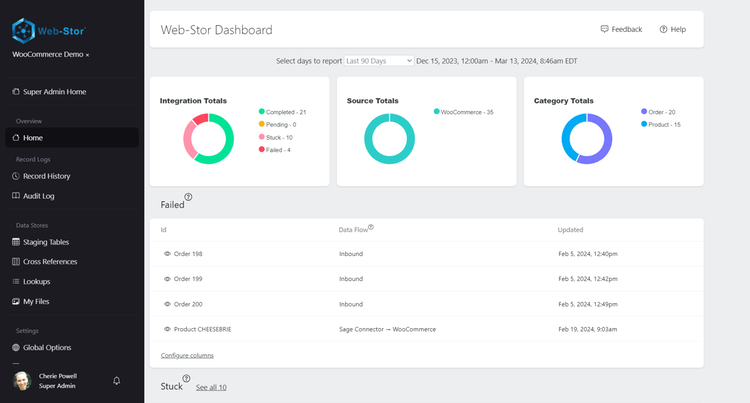
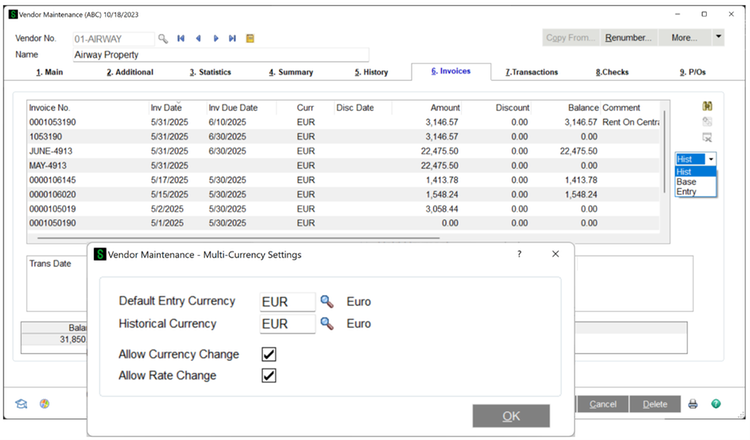
Potential customers can sign up on the Sage website to test out the interface and launch the online product demo. Sage also offers video tutorials and resources with more info on their website. While specific pricing information will depend on the characteristics of your business and the modules you choose for your installation, reviews from around the web indicate that Sage 100 is very affordable, especially compared to solutions focused on large enterprises, like Sage 300 CRE.
Sage 100 Contractor is an incredibly popular construction management software and has been around for many years. Because of this, there are tons of reviews around the web for interested buyers looking to read more about the user experience. Most users rate it very highly, with the main complaints being a lack of field support, regular update requirements, and compatibility issues specifically when running 64-bit versions of Microsoft Excel. However, most reviewers give it high marks based on the tool’s robustness, intuitive interface, and reporting capabilities.
We like Sage 100 Contractor and recommend it as one of the most popular and robust construction project management tools on the market. We also rated it as the Best On-Premise Construction Project Management Software.
Smartsheet (Best for Small Business)

Smartsheet is one of the best-regarded software tools for project management across a variety of fields and industries. First released to the public in 2006, Smartsheet boasts millions of users and strong reviews today. With several templates and features customized for use in the construction industry, Smartsheet has emerged as an excellent tool for navigating construction project management.
Pros
- Its simple spreadsheet-based interface is familiar and intuitive
- Extensive integrations with other common business software providers
- Transparent, reasonable pricing for small business customers
Cons
- Integrations with other construction software are fairly limited
- Despite the availability of construction-focused templates, it’s not designed for construction specifically
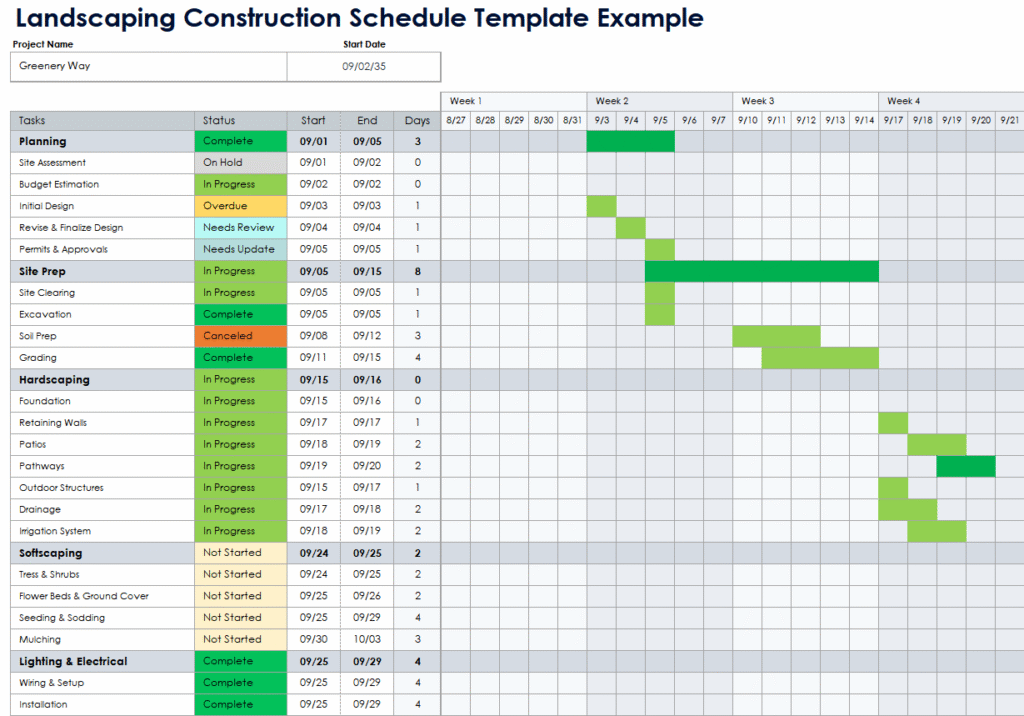
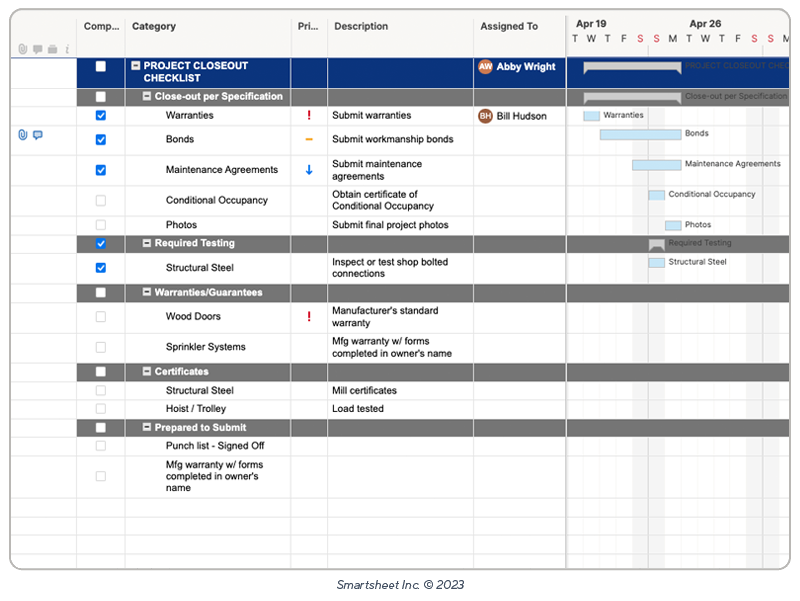
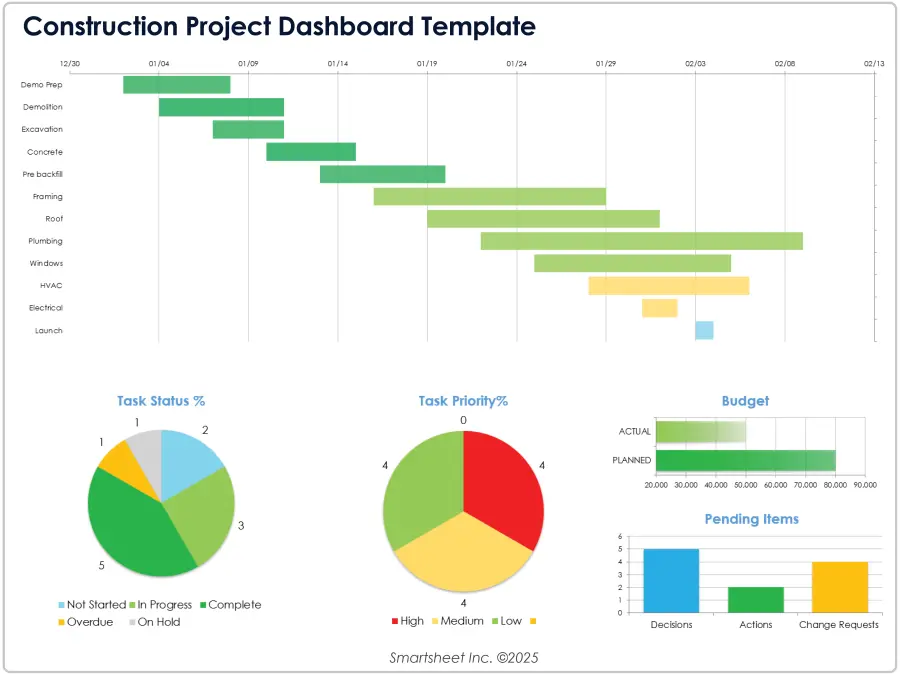
Smartsheet is a cloud-based platform that uses a spreadsheet-like interface to organize projects, so any user with spreadsheet experience should find Smartsheet’s core tools to be familiar and intuitive. The software includes a number of templates that allow users to easily layout project information like tasks, due dates, and dependencies and then build out forms, calendars, reports, and other documents accordingly. Users can also attach files, images, and documents to tasks to stay on top of work progress.
For construction users, Smartsheet has developed templates for project timelines and visualizations, estimating, punch lists, closeout checklists, and more. Built-in tools for reporting and the resource planning tools help construction businesses forecast future needs and make decisions more quickly. And with iOS and Android mobile capability, team members in the field can also capture issues in real time and share them back with the project team.
One of Smartsheet’s best features is its integration with other common software platforms. Microsoft, Google Drive, Salesforce, Adobe Creative Cloud, DocuSign, Dropbox, and Box are among the major technology providers that can integrate with Smartsheet. Some construction-specific tools like Procore can also be linked, but these integrations are fewer in number than other construction project management software products.
Smartsheet offers tiered subscriptions, including a Free plan for individuals and straightforward pricing for its paid tiers. A Pro subscription costs $9 per member per month (billed annually) for up to 10 paid members; while it provides more limited features than higher tiers, it now includes unlimited sheets and allows for unlimited free contributors to view or edit work. The Business subscription is $19 per member per month (billed annually) with a three-seat minimum and offers all the features of a Pro subscription plus more advanced features for creating documents, building reports, and managing complex workflows. For businesses with more complex needs, Smartsheet also offers a customized Enterprise tier that integrates more closely with the business’s systems and provides superior data governance features and customer support.
Ultimately, Smartsheet lacks some of the industry-specific features and integrations that shoppers may find with purpose-built construction project management software. That said, the excellent user interface, integrations with common software tools, and reasonable pricing for its lower-tier subscriptions still make it a worthy option. For these reasons, Smartsheet is our runner-up pick as Best for Small Business.
STACK Build & Operate (Best for Document Management)

STACK Build & Operate (formerly SmartUse) is a cloud-based construction management tool created in 2012. With more than a decade in the field, the platform has become one of the top solutions on the market. While STACK is renowned for its industry-leading real-time blueprint sharing and markup tools, it has evolved into a comprehensive project management suite that competes directly with tools like Procore and Buildertrend.
Pros
- Excellent document control and management features such as search, organization, and side-by-side viewing
- Among the best team communication and collaboration tools
Cons
- Some advanced project management workflows may require a higher-tier subscription
- The per-user pricing model can add up quickly for large teams
STACK has a cloud-based app available for iOS, Android, and Windows. The tool is optimized for each operating system, so while many features are designed for tablets or mobile devices in the field, it will work well on Windows laptops and desktops as well. The app also has an offline mode that makes it possible for users to review and edit documents even when internet service is limited.
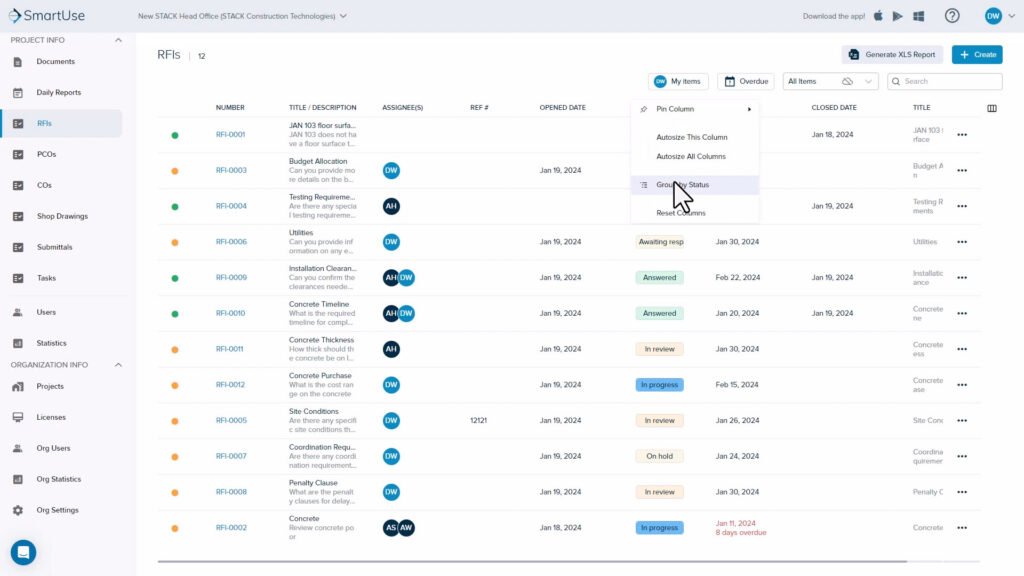
STACK’s standout features are in document management and navigation. STACK seeks to offer users a “single source of truth” on construction projects. This means having one location that makes it easy for team members to keep track of project plans, specs, RFPs, bidding requirements, renderings, and other important documents. STACK meets all of these needs with helpful navigation features like hyperlinking documents, word searchability, stack and side-by-side viewing, and clear organization systems with auto-naming and auto-numbering functionality. These convenient, intuitive tools make it easy to stay on top of project details.
Further, STACK recognizes that it is important for users to be able to access, edit, and collaborate on these documents from multiple devices, in the office or on the job site. In addition to making it easy to keep track of documents, STACK has strong collaborative tools like takeoffs, redlining, comments, measurements, and photos. STACK also has good functionality for capturing, logging, and assigning issues, with tools to record details (e.g., location, description, impacts), tag associated photos or documents, and make assignments.
STACK has solid training and support available. The technical team is available to answer inquiries by phone during normal business hours or through chat and email. Training is offered through on-site or virtual formats, depending on user preference.
STACK Build & Operate pricing starts at $599 per user per year for its Essential plan (averaging about $50 per month) or $699 per user per year for its Pro plan. These rates include unlimited projects, sheets, and documents, along with several other features. STACK’s pricing delivers more value than competitors with similar price points and pricing models, who typically have stricter limits on the number of projects or sheets that can be active at one time, as opposed to STACK’s unlimited capacity. However, for midsize or larger businesses, the per-user costs can quickly add up to exceed the rates for other top tools on the market. Companies with more than 20 users do get some additional benefits, however, including a dedicated customer success manager and unlimited reviewers, which permits external users (e.g., subcontractors, clients) to review documents but not mark them up.
STACK Build & Operate offers a number of strong features for project management and has great value, especially for smaller teams. Its best functionality is in organizing, accessing, and collaborating on project documents, which makes STACK our pick as Best for Document Management.
Best Mobile Apps for Jobsite Connectivity
The days of printing out revised drawing sets and physically running them to the job trailer are over. Today, construction project management software lives and dies by its mobile application. If the software works flawlessly on a desktop in the office but crashes or lags on a foreman’s iPad, it will not be adopted by the field.
When evaluating mobile applications for jobsite connectivity, contractors must look beyond basic mobile-responsive web pages and focus on operational realities:
- Offline Syncing: Job sites are notorious for dead zones, especially in deep basements, concrete elevator cores, or remote civil projects. The best apps allow users to download the current set of drawings, drop pins, take photos, and write daily logs without an internet connection. The moment the device hits Wi-Fi or cellular service, the app automatically pushes the updates back to the cloud.
- Native Application Performance: A web browser trying to render a 150-sheet high-definition blueprint will lag, freeze, and drain a tablet’s battery. Top-tier software provides native iOS and Android apps specifically engineered to process large rendering tasks quickly without burning up the device.
- Field-Friendly Interface: Superintendents and foremen are managing active, hazardous environments. They need large, intuitive buttons, voice-to-text dictation for daily logs, and fast photo uploading. If it takes six taps to assign a task, the field will revert to text messages and phone calls.
Based on mobile reliability, offline performance, and field adoption, these are the strongest mobile apps currently on the market:
| Company | Summary | Pricing | Get Started |
|---|---|---|---|
|
Procore
|
Industry standard with highly reliable offline sync for drawings, punch lists, & daily logs | $$$$ | |

Fieldwire
|
Leader in mobile-first design, known for the fastest blueprint rendering speeds on tablets | $ | |
|
Buildertrend
|
Top residential builder & remodeler solution, offering quality tracking tools for field crews | $$$ |
*We may earn a commission when you click through these links.
Understanding Construction Project Management Software
Every construction project represents a detailed process with countless moving parts, dependencies, and complexities. Success in the business requires construction companies to effectively plan, track, and execute their projects to meet client expectations, manage costs, and maximize profits. And because project management is so critical in the field, people and tools that can manage construction projects effectively and efficiently are a necessity for any construction business.
Construction project management software is one such tool. The purpose of construction project management software is to provide a unified environment for owners, general contractors, and their project teams to streamline the project management process and leverage data-driven insights to be more effective throughout a construction project. But to understand how this software serves construction project management needs, it’s necessary to first understand what the construction project management process entails.
Project Management in Construction
Construction project management is the coordination of people, materials, and equipment toward the completion of a construction project within defined requirements of cost, schedule, scope, and quality. In other words, construction project management refers to the oversight of many different aspects of the project to ensure timeliness and efficient use of capital.
Phases of Construction Project Management
According to the Project Management Institute, one of the leading professional organizations devoted to project management in the U.S., every project traditionally follows five key process groups:
- Initiating: when project stakeholders establish the overall goals and formally authorize the project
- Planning: when the project team establishes the scope, project plan, budget, and key roles
- Executing: when resources are put into action and the project work is carried out
- Monitoring/Controlling: when project managers track resource usage and project progress, taking corrective action as needed
- Closing: when deliverables are completed and approved, records finalized, and the project is formally closed out
This framework applies to projects in any field, and construction is no exception. The initiating phase often begins during the initial project conception or during negotiations before a contract is finalized. The planning phase, often called preconstruction, may involve conducting site analysis, completing designs, obtaining permits, securing builders risk insurance, negotiating scopes of work with subcontractors, and allocating supplies. Executing entails the actual physical building and installation of project components. The last two phases—monitoring and closing—are essential for making sure that construction projects are completed within scope and budget so that clients are satisfied, quality standards are met, and projects prove profitable.
On top of these components, construction project management includes many unique challenges. From code requirements and liability risks to complicated financing and subcontracting arrangements, construction project managers face particularly tough constraints in ensuring project success at all steps in the process.
Construction Project Management Roles
No construction project is quite the same in terms of complexity, size, budget, or delivery method, so the project management function may look different from job to job. Construction project managers may be housed within a general contractor, an owner, or both. Project management may be the function of a dedicated team that coordinates across different parts of an organization. Or, for smaller firms or projects, it could be the purview of a single individual.
Regardless of how a project team is configured, it’s true in construction project management, as with any form of project management, that the ability to gather and communicate information over the entire project lifecycle from and to all stakeholders is essential to success. The person or team designated with the construction project management responsibility must be able to keep track of everything going on in a project, identify issues as they arise, and ensure that team members have the right information they need to complete projects.
Construction Project Management vs. Construction Management
Construction project management and construction management are terms that sometimes will be used interchangeably when discussing managing construction projects, but there are important distinctions between the two.
The exact differences between the project manager and the construction manager on each given project will vary based on the complexity of the project and the stakeholders involved. In some instances, the roles of both may be occupied by the same team or individual. And each party shares common goals—delivering projects on time, within budget and scope, and to a client’s desired standards—along with qualifications and skill sets, like expertise in construction and project management techniques, communication, and stakeholder engagement.
One helpful starting point for understanding the distinction generally is that construction management is a form of project management, and both roles can span the entire project lifecycle. According to the Construction Management Association of America, construction management is a professional service that provides an owner with effective oversight of a project’s schedule, cost, quality, and scope. While the terms are often used interchangeably, the CMAA defines construction management as a practice applied from project inception to completion—covering planning, design, and procurement in addition to the construction phase. In industry practice, some distinguish the roles by focus, with project managers often handling broader strategic aspects like real estate development or high-level financing, while construction managers focus on the technical and field-level execution of the build.
As outlined above, construction project management is a complicated role that requires skillful planning, organization, and communication. Because so much depends on successful project management in the construction industry, tools that can help construction project managers collect, analyze, and communicate information about projects are in high demand.
Construction project management software is the category of software that assists with these responsibilities. In the next section, we will cover what construction management software contains and some of the essential features that help teams manage projects.
What Is Construction Project Management Software?
Construction project management software is a form of collaborative technology that allows the parties involved in a construction project to find, share, and update information related to the project.
Construction project management software is often the primary collaboration tool for individuals and teams working on construction projects to share information. This ability to collaborate and share information is critical for the construction project management process. Project managers need information from the field to accurately track project progress against plans and budgets, while supervisors in the field may need to know about updates to things like project scope or resource availability.
Beyond collaboration and communication, construction project management software includes a variety of tools to track progress and costs. This includes core features for document management, scheduling, RFIs (Requests for Information), submittals, and change order management. Many platforms also incorporate modules for quality assurance, safety compliance, and contract or permit tracking. And many software companies also link project management functionality to other key construction software programs or modules, like estimating, takeoff, and accounting.
Below we’ll take a deeper dive into the key features to look for in construction management software.
Construction Project Management Software Features
Construction management software vendors each bring something different to the table in terms of features and functionality. While software companies often have their own unique workflows, industry standards like ISO 19650 have established a common template for information management and BIM data. These standards provide a more uniform framework for core features—such as Common Data Environments (CDE)—and terminology across much of the category. If you’re looking for a specific feature or have a unique use case, getting a product demo may be the best way to ensure that the tool offers exactly what you need.
Despite differences between specific products, however, construction project management software is designed to address similar challenges and cover the same key functionality. Below are some of the key areas of construction project management software functionality to look for and compare when shopping for a software solution.
Scheduling & Task Tracking Features
The ability to deliver projects on time is critical for satisfying customers and ensuring that projects are profitable, as delays frequently add costs and increase liabilities. This means that project managers must be skilled at establishing and maintaining project timelines to ensure that every phase of the project moves forward on time. Construction project management software helps project teams understand how the work is progressing, from overarching project plans to updates on daily tasks.
Common features for scheduling and task management tracking include:
- Timeline visualizations: Most top products allow users to create master project schedules as Gantt charts to track dependencies and milestones, while many also include kanban boards specifically for managing daily field tasks. Modern platforms now incorporate AI-driven predictive analytics that use historical data to automatically forecast potential delays and identify timeline risks before they impact the project.
- Calendars: While Gantt charts and other timelines are helpful for project managers, some team members may prefer a simple view of their team’s daily or weekly tasks. Many products include calendar views or integrate with products like Google Calendar or Outlook to make this information easy to access.
- Task lists: Task lists form the basis of almost every project management software platform, including construction-specific solutions. The best platforms make it easy to not only create and organize task lists but also link relevant files and correspondence to provide detailed information.
- Daily logs: Daily logs are one of the essential tools for providing a record of work done on a project, and construction management software includes tools that make it easy for team members to provide updates along with notes and documentation about progress made.
- Punch lists: Punch lists are a critical resource for identifying and resolving deficiencies or minor incomplete tasks before project closeout. Construction management software streamlines the creation of these lists during walkthroughs, assigning responsibility to subcontractors and setting due dates for corrections. Leading platforms link these items to financial modules and the project schedule to track the cost of rework and its impact on the final handover date, while many modern tools use AI to automate list generation from field reports and prioritize defects based on their potential impact.
- Automated notifications: To make sure that tasks do not fall through the cracks, many software tools will notify team members when a task has been assigned to them and provide automated reminders when a task is due or overdue.
*For contractors that primarily need scheduling capabilities, construction scheduling software can be a simpler and less expensive solution to consider.
Document & File Management Features
Over the course of a construction project, many documents are shared between the contractor and the owner, their subcontractors, suppliers, or other involved parties. Maintaining strict daily logs and centralized submittals is one of the best ways to prepare for a general liability insurance audit or fight a subcontractor liability claim. Managing the flow of these documents and files can become exponentially more challenging as projects grow in size. Luckily, many construction management tools take care of this with storage and collaboration capabilities for project plans, subcontractor contracts, receipts, and other important documents. Key features to look for include:
- File storage: While document storage is a standard feature, most construction-focused platforms in 2026 offer unlimited capacity to support large-scale BIM models and high-resolution site photography. Rather than gigabyte limits, a more significant differentiator is whether the software provides AI-powered document intelligence for automated tagging and adheres to Common Data Environment (CDE) standards for formal information management.
- Submittals and RFIs: Submittals and RFIs are essential for project coordination. RFIs clarify ambiguities in design or contract documents, while submittals—such as shop drawings and material samples—are provided by contractors for approval to ensure compliance with project specifications. Modern solutions in 2026 use AI to automate the creation of submittal logs from specifications and streamline RFI workflows, creating permanent records that keep the field and office teams aligned.
- Change orders: Most construction-focused project management solutions include functionality to create and manage change orders on a project within the software. This produces an easy process for customers to review and approve change orders while allowing the project team to document changes and their financial impact easily.
- Plan markup and BIM coordination: Many tools allow users to provide updates on 2D project plans and 3D BIM models directly within the software. Advanced version control and real-time model synchronization ensure that both office and field teams are working off the most current design iterations and model views.
- Task attachments: Team members should be able to easily find files and information related to tasks that they have been assigned. Top products allow project managers to link drawings, photos, correspondence, documents, and other files to specific tasks.
Financial Management Features
Monitoring project costs is an important responsibility for many project managers. However, it’s worth noting that the tools available in a project management solution may not be as robust as a product devoted specifically to functions like construction accounting or construction estimating. For companies with more complex needs, shoppers may want to evaluate financial management modules in an enterprise construction management software or look for integrations with other finance and accounting solutions.
With that said, some construction project management software does include functionality to help with managing project budgets and finances. Below are some features to consider:
- Budgeting: Some tools allow users to develop project budgets and monitor costs based on labor, materials, subcontractor invoices, change orders, and more. Budget to actual reporting can help keep track of the project’s costs relative to expectations.
- Resource management: Features that allow project managers to view team and equipment availability and assign resources accordingly are important both for maintaining schedules and for managing costs. While some platforms include material tracking for deliveries, resource management primarily focuses on optimizing the deployment of labor and machinery.
- Cost Code Tracking: Allows project managers to categorize and allocate expenses according to standardized cost codes. This feature enhances the tracking of specific expenses within job phases, making it easier to monitor budgets and ensure accurate billing.
- Retainage Management – Some tools include functionality to track withheld funds for retainage, ensuring accurate allocation and reporting. This helps project managers manage cash flow and meet contractual requirements for retainage release.
- Purchase orders: Project management software can allow contractors to send purchase orders for review and approval to suppliers and vendors, which helps with tracking material status and payments. For labor-intensive work, these tools may also manage subcontracts to ensure compliance and accurate progress billing.
- Bids and contracts: More comprehensive construction management tools may include processes to seamlessly solicit bids from subcontractors, generate contracts, and link them to a project’s schedule of values. This ensures that every contract line item is tied to a specific budget category, facilitating more accurate progress billing and financial tracking.
- Invoices: With invoicing capability, change orders or customer selections can be quickly generated into an invoice to create accurate financial records and ensure timely payments.
- Forecasting: Cost savings or overruns in one phase of a project can have implications for other phases down the line. For this reason, some construction management solutions provide users with forecasting capabilities to see how current spending may impact total costs and profitability in the future.
Communication Features
One of the project manager’s key responsibilities is communication, whether with team members, clients, vendors, or other stakeholders. The best construction management solutions include tools that help project managers collect and share the most up-to-date information with stakeholders who need it.
Communication features in construction management software include:
- Mobile compatibility: To make field-to-office communication more efficient, modern software provides mobile apps with offline-first capabilities, allowing team members to log information in remote areas and sync it automatically once they regain connectivity.
- Real-time synchronization: Cloud-based technology ensures that all project stakeholders—from the field to the office—are working off of the most recent plans and updates to prevent rework.
- Centralized correspondence: Most solutions include dedicated correspondence modules or email integrations that log all project interactions into auditable threads, ensuring a single source of truth for formal workflows like RFIs and submittals.
- Owner portal: Many construction management solutions include portals for project owners or developers to access real-time status reports and milestone dashboards, which helps maintain transparency and trust.
- Subcontractor portal: To streamline collaboration with trade partners, software often includes portals where subcontractors can access the specific files, project plans, and schedules relevant to their scope of work.
Reporting & Analysis Features
Project managers for particularly complex projects need to be equipped with insights that will allow them to understand the project’s progress and make adjustments as necessary. Reports, dashboards, visualizations, and other tools for analysis can provide high-level information about the project’s health and progress. Top solutions now leverage AI-driven predictive analytics to forecast potential schedule delays and cost overruns before they occur, allowing project managers to take proactive corrective action. Beyond standard automated reporting, these platforms provide real-time dashboards integrated with field data and BIM models to ensure teams have a live, predictive view of the project’s health and trajectory.
Project managers or other stakeholders may have different preferences for the content of reports and dashboards. Shoppers should ask about pre-built resources along with capabilities for customized reporting and analysis.
Integrations
Integrations are useful both for offering functionality that may not be built into a particular tool and for improving the flow of information between different functions within the business. Most leading construction project management products offer extensive lists of integrations with other software products to accomplish these goals. Common examples include integrations with construction accounting software, legal and compliance, CRM, takeoff, and bidding software. In these cases, integrating across software products can help improve the quality of information available to different teams or for different purposes. If you rely heavily on a particular software solution for one aspect of your business, it may be worth seeking out construction project management software that integrates cleanly with your other business tools.
RELATED
Do you regularly move expensive tools and equipment across multiple locations? Make sure your property is protected by one of the best inland marine insurance companies.
Construction Project Management Software Pricing
While construction project management software has great advantages for helping teams plan, track, and execute projects, business owners always want to seek out good value for the tools they use. Knowing how software companies price their products and the factors that are likely to affect the cost is critical for being a smart shopper. Having this information helps ensure that construction businesses pay a reasonable price for software that is appropriate for their needs.
Unfortunately, pricing information about construction project management can often be difficult to find. One reason is that software providers frequently scale their costs based on a firm’s total Annual Construction Volume (ACV), and the methodology for measuring this volume can vary. While some niche products designed for independent contractors still maintain transparent pricing, many leading tools for small businesses transitioned to custom-quote models in early 2026. Consequently, the best way to get accurate cost estimates is usually to reach out to providers directly for quotes tailored to your specific volume.
With that said, information is available from software companies, customer reviews, and other sources that give a window into what users should expect to pay and key variables affecting cost. You can find some of this information below, along with some suggestions for those on a very limited budget seeking a free version or cheap alternatives to a full construction management software solution.
How Much Does Construction Project Management Software Cost?
Like most software solutions, the specifics of construction project management software pricing will vary from business to business. However, many construction project management software products offer subscription pricing starting between $25 and $50 per user per month for basic feature sets. This is a common entry point for smaller teams who require dedicated field tools but have limited project complexity. As companies move up in size or in the complexity of their software needs, this cost grows. Pricing for middle-tier products frequently ranges from around $50 to $100 per user per month, while the most comprehensive solutions typically start at $150 per user per month.
Some vendors offer pricing structures that are not dependent on the count of users or projects managed on the platform, instead offering a flat monthly fee. Typically, these fees can range from $400 to $1,500 per month, though some products offer truly comprehensive packages meant for larger customers that can exceed $2,000 per month.
At the enterprise level, software solutions are more customized to individual needs. These deployments include more comprehensive feature sets, higher user counts, and frequently dedicated training and support that all add to the cost. These tools can cost tens of thousands of dollars per year for mid-sized firms, but at the enterprise level, annual subscriptions often range from $100,000 to over $500,000. This is especially true when platforms incorporate other critical modules like accounting, estimating, or advanced BIM integrations.
Factors Affecting the Price of Construction Software
1. Business Size
Business size is perhaps the most critical factor determining what a company will have to pay for construction management software, especially for larger enterprises. Many companies offer tiered pricing based on factors like the number of users or access to certain features, but larger companies may pay additional fees due to the higher volume of work they manage through the software.
Software providers may request a percentage of a firm’s total revenue on projects managed through the software, or costs may scale directly based on the number of projects managed. This ‘Construction Volume’ pricing model is standard for many providers, as it aligns software costs with the scale of work and often allows for an unlimited number of users. Because of this, smaller construction businesses may be able to pay lower, more straightforward fees while monitoring the amount of work done through the software, while larger businesses may need to plan for higher fees when shopping. And this factor may be most significant for businesses that are growing, as their software costs eventually will begin to scale with more work.
2. Number of Users
In addition to the amount of work being managed through the platform, software providers may scale pricing more simply based on how many people are using the tool. Tiered pricing is common among construction project management software vendors, and one frequent difference among tiers is the number of users. For instance, one product’s cheaper base-level tier targeted at small contractors may allow five users, while a more expensive tier designed for mid-sized firms may allow 25. However, many enterprise-level platforms now offer unlimited user seats at higher tiers, instead scaling costs based on the total dollar volume of construction managed through the platform.
The number of users may affect pricing in other models too. For instance, some providers scale their costs directly based on the number of users; in contrast, some platforms offer unlimited users but have more limited feature sets at certain tiers. And in addition to the number of users, the type of user may also have an impact. Some providers may charge differently for workers using mobile devices to report information or view a document in the field than they would for a back-office employee who needs greater access to other features.
3. Features & Modules
Customization is common in construction project management software, especially for enterprise customers whose needs may be more specific or complex than smaller companies. Software providers may work with customers to define specific business requirements and then deliver a package of features and modules precisely tailored to those needs.
This level of customization can have both pros and cons for price. On the downside, adding features or modules beyond what might be included in a standard software package typically comes with added costs for initial setup and potentially ongoing support. But the positive news is that adding other modules to a project management solution, such as estimating or accounting, can help streamline software procurement and save money that would have been spent elsewhere. Businesses may also be able to save by forgoing functionality that is not essential to their needs.
4. Deployment
Cloud-based software is the established industry standard for construction management, though some legacy providers still offer onsite installations for specific enterprise needs. On-premise deployments are now largely niche solutions, typically reserved for organizations with unique regulatory requirements or high-security data constraints.
Notably, businesses’ decisions about using a cloud-based or on-premise solution will have an impact on costs. On-premise deployments usually have a high upfront cost to purchase licenses and have the software installed, while ongoing costs primarily consist of annual maintenance and support fees. Cloud-based software usually is paid for on a subscription basis, so customers pay to access the tools on a monthly or annual basis. While costs tend to be comparable over time, customers may want to consider the differences in pricing structure as one factor when deciding on deployment type.
Cheap Alternatives to Construction Management Software
For smaller businesses on tight budgets, the sometimes hefty fees that accompany top construction project management software solutions may feel hard to justify. While software providers and their customers will tout the ROI from more effective and efficient project management, a full deployment of the top options on the market may not be in the budget for every business.
One starting point for businesses in this situation is to explore a basic subscription tier for a dedicated construction project management solution. Many of these products have tiered pricing that expands the availability of certain features or increases the number of users as customers pay more. Construction businesses that are willing to use more basic functionality or can limit their users may be able to enjoy some of the benefits of construction project management software for lower costs.
Another option is to find a free version or an affordable non-construction project management solution. Project management software is a common need for businesses of all types, so there are plenty of options on the market for an all-purpose project management solution. These software products may not have construction-specific functionality or integrations, but they are more likely to have free or lower-cost offerings. For example, well-regarded project management products like Trello have free tiers for teams of up to 10, while Asana offers a free version for up to two users. Additionally, Microsoft’s Planner is included in the Microsoft 365 subscriptions that many businesses already have.
Frequently Asked Questions
What is construction management software?
Construction management software, often called construction project management software, is a specialized technology that facilitates the coordination of people, materials, and equipment to complete projects within defined requirements of cost, schedule, scope, quality, and safety. At a high level, it is an intelligent, centralized hub that allows stakeholders to access real-time data and predictive insights throughout the construction project lifecycle.
What is the best project management software for construction?
While there is no single best product for every use case, some of the best project management software for construction include Procore, Buildertrend, Smartsheet, RedTeam, Sage Construction Management, and Autodesk Forma Build.
What are the most important features for construction management software?
Every product offers a slightly different set of features; however, the most important things to look for in construction management software usually fall into one of the following categories: 1) estimating and preconstruction, 2) scheduling and task tracking, 3) document and file management, 4) financial management, 5) quality and safety management, 6) field management and communication, 7) reporting and analysis, and 8) integrations.
How much does Procore and other construction project management software cost?
Pricing for Procore depends largely on the volume of construction business you run through the Procore platform, as well as which specific Procore products you elect to include in your subscription. Outside of Procore, pricing for project management software in the construction industry ranges widely, from a few dollars per user for basic tools to flat-rate monthly fees or hundreds of dollars per user for comprehensive solutions. At the enterprise level, comprehensive construction software suites can easily reach hundreds of thousands of dollars annually for large-scale operations.
References
- Better Business Bureau. https://www.bbb.org/.
- Procore. https://www.procore.com/.
- Buildertrend. https://buildertrend.com/.
- RedTeam. https://redteam.com/.
- Autodesk. https://construction.autodesk.com/.
- Sage. https://www.sage.com/en-us/products/sage-construction-management/.
- Stack Construction Technologies. https://www.stackct.com/.
- Smartsheet. https://www.smartsheet.com/solutions/construction.
- Project Management Institute. https://www.pmi.org/.
- Construction Management Association of America. https://www.cmaanet.org/.
Detailed Methodology: How We Found The Best Construction Project Management Software
Methodology: How We Found The Best Construction Project Management Software
Our research team carefully evaluated several factors to identify the best construction management software. We extensively reviewed dozens of companies and products, ultimately narrowing down the list to our top choices.
It can be overwhelming to navigate the vast range of construction software available, as some products cover various aspects of the construction process, while others focus solely on specific features such as scheduling or document management. To make it onto our list of the top construction management software, each product had to be able to serve as the primary collaboration and information-sharing tool for individuals and teams working on construction projects. This requirement encompasses scheduling and task management, document and file management, communication features, project financials and budgeting, and field management tools such as RFIs and daily logs.
Continue reading for an in-depth description of each ranking factor.
Features & Integrations
Many construction project management solutions offer similar core functionality, allowing users to manage schedules, communicate changes, process RFIs, and monitor budgets. Where products differ is largely in how this functionality is implemented—with some offering a far more intuitive user experience—and the extent of their native feature sets versus third-party integrations. Certain products also provide workflows and features that are specific to different customer types (e.g., remodelers, commercial developers, specialty contractors, etc.), which is vital for firms working within specific industries or trades.
In identifying the best construction management software for 2026, our team focused heavily on how well each product implemented scheduling, document management, and BIM-integrated workflows. We also evaluated the software’s native capabilities for takeoff and estimating, alongside its ability to integrate with essential third-party tools like construction accounting software and CRMs. We prioritized platforms that offer seamless data synchronization and AI-driven insights to enhance overall project visibility.
User Experience
Because there are so many products in the category, users will find that different tools offer unique interfaces and approaches to different product features. Some construction software products are designed with usability as a primary concern, emphasizing sleek, intuitive interfaces to make the products easy to learn. Others may feel more clunky but offer other benefits, such as richer features.
For our rankings, we assessed how user-friendly and intuitive each product is, particularly for non-technical users. We evaluated mobile-first responsiveness, offline synchronization capabilities, and overall interface design, assigning more points to products that make it easy for novice users to learn and maintain full functionality in the field, even when disconnected from a network.
Fortunately, many companies allow prospective buyers to evaluate software through a live product demo or, in some cases, a free construction management software trial. These opportunities allow customers to view the product’s interface and features before committing. We also provide screenshots and videos alongside our reviews to help users evaluate the software’s usability.
Customer Service & Support
Even the best-designed and best-implemented software will occasionally give users problems. In these situations, customers may need to quickly connect with the provider’s support team to ask questions or troubleshoot an issue. This is especially important for contractors on a tight timeline. For particularly sophisticated or complex software like construction software, customers may also need dedicated training to help new users get up to speed on all the functionality.
For these reasons, we looked at the level of customer support provided by each software vendor. We evaluated the availability of live technical support, AI-powered self-service portals, knowledge bases, and dedicated training or implementation assistance. Additionally, we consulted leading software-specific review platforms like G2, Capterra, and TrustRadius to better understand companies’ reputations and responsiveness to technical complaints or user issues.
Software Deployment & Accessibility
Construction management software can be categorized into two types: cloud-based and locally installed (or on-premise). Cloud-based tools are typically accessed via web browsers or mobile apps, making them the preferred option for users who need remote access or teams that use a combination of Windows and Mac machines. While they offer broad compatibility, users should verify that their field hardware meets the software’s minimum operating system and browser requirements for optimal performance. They are also ideal for companies with highly collaborative processes because real-time updates enable immediate communication between the office and job sites.
Scalability and security are two additional areas of consideration when choosing between cloud and on-premise construction software. Cloud software is better equipped to handle scaling as businesses grow, especially software that allows an unlimited number of users and projects. Additionally, cloud solutions are generally considered more secure because providers offer enterprise-grade infrastructure protection and automated patching. However, companies still remain responsible for managing user access and proper security configurations within the ‘shared responsibility’ model typical of 2026 cloud platforms.
For these reasons, we prefer cloud construction software for most applications. We assigned more points to cloud-based solutions; however, we did still include a few locally installed products in our guide for certain use cases.
Pricing
The pricing model of construction project management systems can vary significantly depending on various factors such as user or project counts, feature sets, tiers, and the annual construction volume (ACV) managed by a firm. Unfortunately, some vendors do not offer transparent pricing, making it challenging to compare products without obtaining custom estimates.
Navigating software pricing can be frustrating, but evaluating it properly is essential. The goal is to match the software to a company’s actual operations rather than simply hunting for the lowest price. Trying to save capital with a stripped-down product often forces project teams into manual workarounds, which quickly erases any upfront savings. Conversely, paying a premium for a heavy enterprise suite is simply a drain on cash if field crews find the tools too complicated to actually adopt.
For each product, we considered the pricing model and cost-effectiveness in comparison to other solutions in the market. We looked at the overall value provided by the software relative to its cost, assigning higher scores to those products with transparent pricing and whose pricing aligns with the value contractors receive.
Expert & Customer Reviews
Until you become a user of a particular software product yourself, one of the best ways to know what to expect is to read reviews from experts and other users. This helps you identify standout pros and cons for each product from various third-party sources, allowing you to make a more informed decision about your software selection. In building our list, we took into account user reviews and ratings from third-party websites to gauge the software’s reputation and satisfaction among contractors. We analyzed user feedback to identify common issues, strengths, and weaknesses of the software, which we discuss in our reviews.
Target Customer
It’s worth noting that there are numerous excellent construction management software options available in the market. It’s important to keep in mind that many of these products have been designed with specific use cases in mind. They are built for general contractors, specialty trades, and homebuilders tracking active job sites—not for real estate investors looking for property management software to handle tenant leases and maintenance requests. Some software solutions are geared towards large firms that handle complex projects, while others are more streamlined for smaller firms or contractors.
It’s not a matter of one product being better than the other, but rather each being better suited to a particular customer type. To help customers navigate these differences, we carefully evaluate each product’s strengths and weaknesses and identify the customer type it’s best suited for in our reviews. This way, our readers can make informed decisions and select the software solution that best fits their specific needs.
For any construction business, the best construction management software is simply the one your team will actually use. While no platform can build the project for you, the right system will protect your margins and keep your field and office aligned. Take advantage of vendor demos and trial periods to ensure your final choice is a practical, seamless fit for your daily operations.