


If you run a construction business by lumping expenses into broad categories like “materials” or “labor,” you will never know exactly where a project is bleeding money. Construction cost codes solve this operational blind spot—and form the basis of effective construction cost tracking—by mapping every single expense to a highly specific phase of your project.
Using established industry frameworks, these codes allow estimators, project managers, and bookkeepers to track real-time job costing down to the exact trade activity—such as pouring concrete or rough carpentry. In this guide, we explain how to structure your codes, break down the differences between major industry standards like CSI MasterFormat, and provide a free, downloadable list to help you standardize your construction accounting.
Download the Construction Cost Codes List
(PDF & Excel Formats)
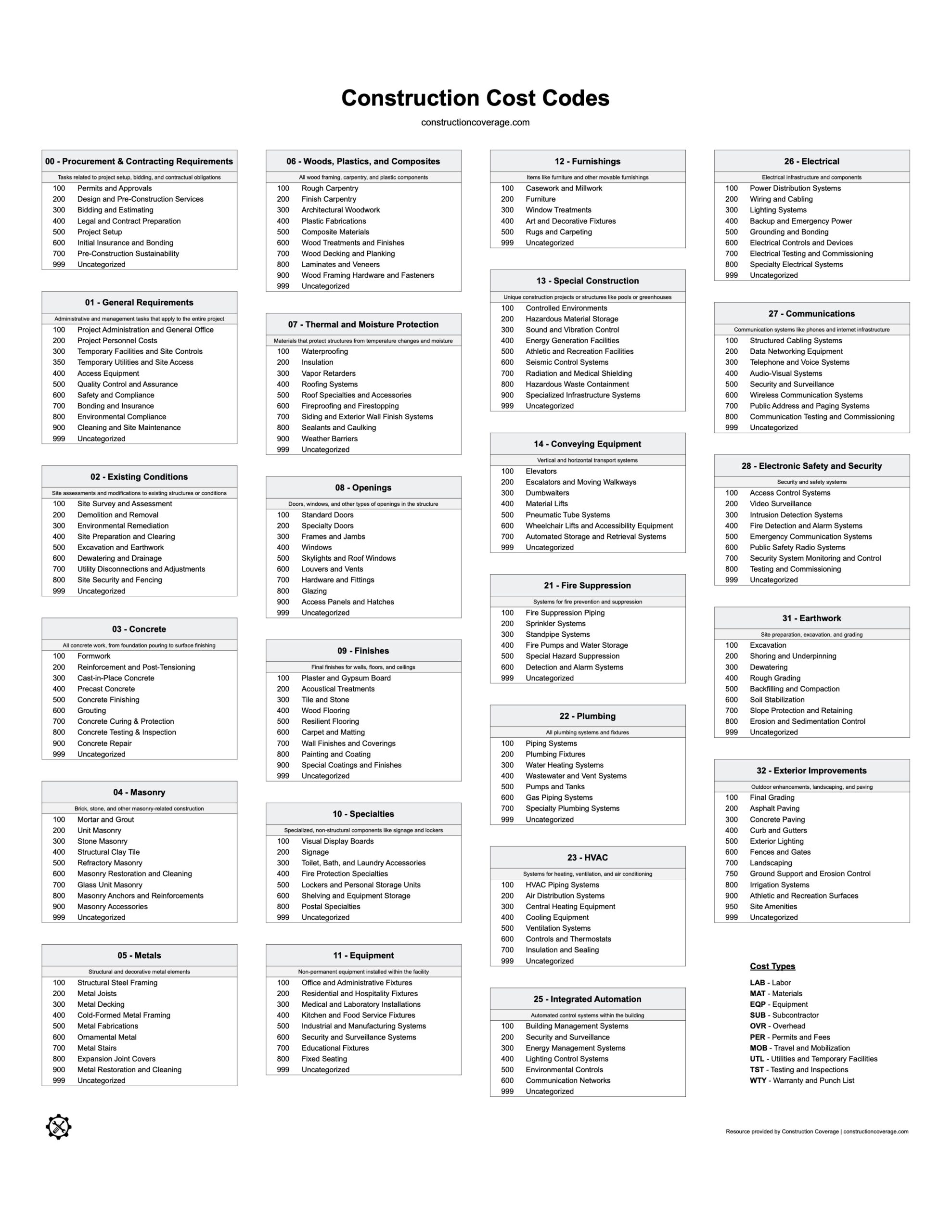
Table of Contents
What Are Cost Codes & Why Are They Important?
Construction cost codes are structured numerical (or alphanumeric) identifiers used to categorize and allocate project expenses. They help contractors track costs across project components and tasks, providing an organized framework for financial tracking. Beyond categorizing costs within a single project, cost codes can be used to differentiate expenses across multiple jobs. This allows contractors to monitor individual project budgets and gain insights into the overall financial performance of their business operations.
Cost codes play a fundamental role in construction accounting by enabling precise tracking of project expenses. This detailed financial oversight helps contractors:
- Avoid cost overlaps
- Monitor budget adherence
- Assess job profitability
- Facilitate clear differentiation of expenses from one job to another
- Support better decision-making and forecasting for future projects
Basic Cost Code Structure (WBS & Phase Codes)
In professional project management, cost codes serve as the building blocks of a Work Breakdown Structure (WBS). A WBS is a hierarchical decomposition of the total scope of work, and the cost codes ensure that every dollar spent is mapped to a specific deliverable.
In larger projects, these are often further organized by Phase Codes. Phase codes allow contractors to track costs over a timeline (e.g., preconstruction vs. fit-out) rather than just by material type.
Example of a Multi-Tiered Cost Code
A typical cost code that represents the labor on cast-in-place concrete for a given job might look like 03-210-LAB-P023:
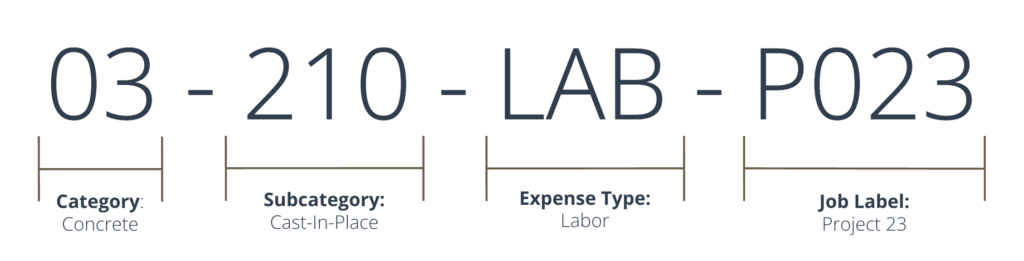
- 03 (Concrete): Category or Division – identifies the primary type of work involved.
- 210 (Cast-in-Place Concrete): Subcategory or Section – specifies the more detailed work category within the main category.
- LAB (Labor): Expense type – clarifies the type of cost being tracked (e.g., labor, materials, equipment).
- P023 (Project 23): Job/Project identifier – links the expense to a specific project, enabling job-specific cost tracking (job costing).
By using this multi-tiered approach, accounting software can generate “granular” reports—showing you not just what you spent on concrete, but specifically what you spent on concrete labor for Project 23. While not shown in the example above, cost codes can also include the project phase code, enabling even more granular reporting.
Standard Cost Codes for the Construction Industry
To maintain consistency, clarity, and precision in project cost tracking, contractors often rely on established cost code standards. These standards are time-tested and provide a clear framework for contractors to improve their cost documentation practices. Here’s an overview of the most common cost code systems and their practical applications:
CSI MasterFormat
Developed by the Construction Specifications Institute (CSI), the MasterFormat is the most widely used cost coding standard in the construction industry, especially for larger commercial and infrastructure projects. This classification system organizes work into a series of divisions (e.g., Division 03: Concrete, Division 09: Finishes), with detailed subcategories (called Sections) that break down tasks within each division. Contractors and project managers often use MasterFormat for comprehensive project documentation and financial reporting. It’s a preferred system for government contracts and large-scale projects due to its standardized, detailed structure that aligns with formal procurement and compliance requirements. Below is a list of the divisions (i.e. cost categories) that MasterFormat uses to code costs:
- 00 – Procurement and Contracting Requirements
- 01 – General Requirements
- 02 – Existing Conditions
- 03 – Concrete
- 04 – Masonry
- 05 – Metals
- 06 – Woods, Plastics, and Composites
- 07 – Thermal and Moisture Protection
- 08 – Openings
- 09 – Finishes
- 10 – Specialties
- 11 – Equipment
- 12 – Furnishings
- 13 – Special Construction
- 14 – Conveying Equipment
- 21 – Fire Suppression
- 22 – Plumbing
- 23 – HVAC
- 25 – Integrated Automation
- 26 – Electrical
- 27 – Communications
- 28 – Electronic Safety and Security
- 31 – Earthwork
- 32 – Exterior Improvements
- 33 – Utilities
- 34 – Transportation
- 35 – Waterways and Marine Construction
- 40 – Process Interconnections
- 41 – Material Processing and Equipment Handling
- 42 – Process Heating, Cooling, and Drying Equipment
- 43 – Process Gas and Liquid Handling, Purification, and Storing Equipment
- 44 – Pollution Control Equipment
- 45 – Industry-Specific Manufacturing Equipment
- 46 – Water and Wastewater Management
Contractors can license the complete MasterFormat cost code structure from the CSI website for use in their projects.
Uniformat
Uniformat differs from MasterFormat in that it organizes costs based on building elements or functional systems (e.g., substructure, superstructure, or services). This system is beneficial for early project stages where specific trade or material details are not fully defined. Contractors often use Uniformat for high-level budgeting and conceptual estimates, as it allows them to group costs by the functions of major building systems. While useful for initial planning, it may be complemented by MasterFormat codes during detailed project phases. Below is a list of the primary cost categories that Uniformat uses:
- A – Substructure: Foundation elements, including footings, slabs, and basement walls.
- B – Shell: The building’s exterior structure, including superstructure, exterior walls, and roofing systems.
- C – Interiors: Interior construction elements, like partitions, doors, finishes, and other non-structural interior components.
- D – Services: Building systems such as HVAC, electrical, plumbing, fire protection, and other essential services.
- E – Equipment and Furnishings: Installed equipment and furnishings necessary for building function, like casework, kitchen equipment, and built-in seating.
- F – Special Construction and Demolition: Specialized structures, alterations, or unique systems such as greenhouses, pools, and seismic bracing.
- G – Sitework: Site preparation, landscaping, utilities, and other exterior work around the building.
AIA Cost Codes
The American Institute of Architects (AIA) has developed cost coding practices that are commonly used in billing and compliance. These are especially prominent in progress billing. AIA cost codes streamline invoicing and ensure clear communication between contractors, clients, and financial stakeholders. While not as comprehensive for detailed cost tracking as MasterFormat, AIA cost codes are often used for contract administration and financial reporting in architectural projects and professional services. For some projects, adherence to AIA standards can be necessary to meet specific contract requirements.
- 01 – General Conditions
- 02 – Site Work
- 03 – Concrete
- 04 – Masonry
- 05 – Metals
- 06 – Wood and Plastics
- 07 – Thermal and Moisture Protection
- 08 – Doors and Windows
- 09 – Finishes
- 10 – Specialties
- 11 – Equipment
- 12 – Furnishings
- 13 – Special Construction
- 14 – Conveying Systems
- 15 – Mechanical
- 16 – Electrical
Choosing the Right Cost Code Standard
Not every project requires the complexity of a 50-division commercial list. Most firms choose a standard based on their specific sector and project scale.
1. Residential & Small-Scale Projects
Residential contractors typically prioritize phase-based tracking. Because home building follows a strict chronological order, these codes align with construction draw schedules (the milestones required to release bank funding).
Many home builders use a simplified 4-digit system that maps directly to their QuickBooks Chart of Accounts or specialized residential software.
Sample Residential Cost Code List
Below is a common structure used by home builders to categorize major project milestones:
| Code | Category | Examples of Tasks Included |
| 1000 | General Requirements | Permits, site supervision, temporary utilities. |
| 2000 | Site Work | Clearing, excavation, rough grading, utilities. |
| 3000 | Foundation | Footings, concrete pour, rebar, waterproofing. |
| 4000 | Framing | Lumber, trusses, subflooring, exterior sheathing. |
| 5000 | Exterior Shell | Roofing, siding, windows, exterior doors. |
| 6000 | Rough-Ins | Plumbing, HVAC, and Electrical (behind the walls). |
| 7000 | Interior Finishes | Drywall, insulation, painting, interior trim. |
| 8000 | Specialties | Cabinets, countertops, flooring, appliances. |
| 9000 | Project Completion | Landscaping, final cleaning, punch list items. |
Pro Tip: If you are a small residential contractor, using a simplified list like this reduces data entry errors in the field while still providing enough data to see which phases of your build are over budget.
2. Custom & Proprietary Standards
Some firms develop proprietary cost codes tailored to niche operations (e.g., solar installers or pool builders). These are often “hybrids”—taking the high-level divisions of MasterFormat but adding unique sub-codes for specialized labor or proprietary equipment.
Comparison: When to Use Each Standard
| Project Type | Recommended Standard | Why? |
| Public / Govt. Work | CSI MasterFormat | Required for strict compliance and procurement. |
| Large Commercial | MasterFormat / AIA | Standardizes communication between GC and architect. |
| Early Budgeting | Uniformat | Groups costs by building system (e.g., “Shell”) before trades are hired. |
| Home Building | Residential / Custom | Aligns with bank draws and chronological phases. |
Automating Your Cost Codes: Software Solutions
Manual data entry is the leading cause of accounting errors in construction. While spreadsheets are a helpful starting point, professional contractors use software to track the flow of costs from the initial bid to the final invoice.
By integrating cost codes into your digital workflow, you ensure that an item like “concrete labor” is tracked consistently across your estimate, field reports, and accounting ledger.
How Software Handles Cost Codes at Each Phase
- Planning & Takeoff: During the estimating phase, tools like STACK or PlanSwift allow you to assign cost codes directly to blueprints. As you measure a wall, the software automatically attaches the “framing” or “drywall” code to that quantity, building your budget as you go.
- Project Management: In the field, platforms like Procore use these codes to track real-time production. When a foreman logs hours or a super orders materials, the expense is tagged to a specific cost code, allowing you to see if you are over budget before the job is finished.
- Accounting & Financials: Finally, accounting software like QuickBooks, CrewCost, or CMiC uses cost codes to automate payroll and progress billing. This ensures that every dollar spent is correctly allocated for tax purposes and profitability analysis.
Top Construction Software With Built-in Cost Codes
| Company | Cost Code Automation | Category | Learn More |
|---|---|---|---|

STACK
|
Automatically assigns cost codes to material and labor items as you measure on the blueprint. | Takeoff & Estimating | |

Procore
|
Uses a master 'Work Breakdown Structure' to sync cost codes across bidding, contracts, and field financials. | Project Management | |

Quickbooks Online
|
Maps 'products & services' to cost codes behind the scenes, so invoices are coded automatically. | Accounting | |

CMiC
|
Supports complex, multi-tiered cost structures and phase segmentation across multiple companies. | Accounting & ERP |
*We may earn a commission when you click through these links.
Conclusion & Next Steps
Effective cost coding is the backbone of a profitable construction business. Whether you use our free PDF list or upgrade to automated software like Procore, standardization is key.
Missed the download? Get the Standard Cost Codes List here.
For a deeper dive into financial management, check out our Guide to Construction Cost Tracking, or explore our software comparison pages to find tools that can streamline your use of cost codes:
- Construction Accounting Software
- Construction Project Management Software
- Field Service Management Software
- Construction Estimating Software
- Construction Takeoff Software
References & Additional Resources
- Construction Specifications Institute (CSI). A national association dedicated to improving the communication of construction information through standardized formats, certifications, and technical documentation.
- American Institute of Architects (AIA). The leading professional organization for licensed architects, providing industry-standard contract documents, advocacy, and research.