


Handling out-of-scope work without a clear process often leads to payment disputes and tension with clients. A change order connects the original contract to what the project actually requires, so everyone agrees on the cost and timeline. When used properly, it turns a verbal request into something documented, billable, and trackable—so it can be included in your schedule of values and your next payment request.
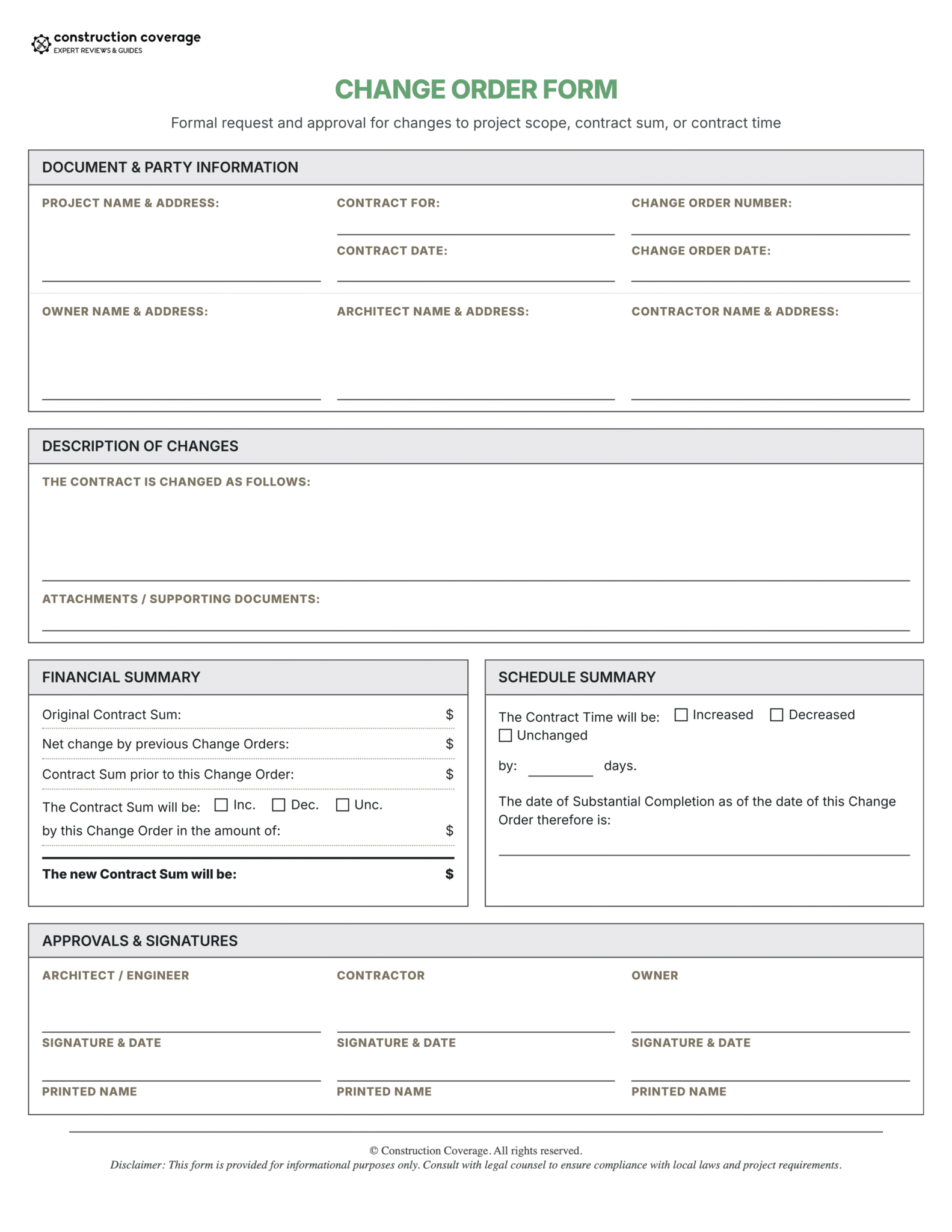
Below, we explain everything you need to know about change orders, including their key components, when to use them, and the step-by-step process. You can also download our free change order template bundle, which includes a standard change order form and a change order log template.
Download the Construction Change Order Form Bundle
Includes Change Order Form and Change Order Log templates in PDF and Excel formats.
Key Takeaways
- Change orders protect your profit, payment rights, and schedule by turning out-of-scope work into a signed contract update—especially important when construction costs are volatile.
- A valid change order must clearly document scope, cost, time impact, and approval (number/date, description, schedule impact, cost change, updated contract total, and signatures) to hold up in disputes or audits.
- Use change orders for any change that affects contract price or timeline, including unforeseen site conditions, owner changes, design errors, and material price increases tied to escalation clauses.
- Don’t confuse change orders with other documents: a construction change directive (CCD) allows work to start before pricing is finalized, while submittals only confirm compliance and do not change the contract or add payment.
- A clear workflow and centralized tracking help move changes from identification to approval to billing, while reducing errors, delays, and version control issues.
Table of Contents
What Is a Construction Change Order?
A construction change order is a legally binding amendment to an existing contract that authorizes modifications to the scope, cost, schedule, or all three. It is the official record that the owner and contractor agree the original plans and specs no longer match what needs to be built, and that the contract terms are being adjusted accordingly.
The main job of the form is simple: protect you from doing extra work for free. When a general contractor (GC) identifies a change due to an owner request, an unforeseen condition, or a design correction, the change order is what allows the contract sum to move with the work. Without it, the original contract pricing often controls, and the contractor may be expected to absorb costs.
Change orders also matter for schedule protection. Even small changes in scope can affect timing. By clearly documenting any added or reduced days, you reduce the risk of being held to the original completion date and having to pay daily financial penalties for finishing late (known as liquidated damages).
The following table illustrates how a change order modifies the core components of the initial construction agreement:
| Component | Original Contract Definition | Change Order Impact |
|---|---|---|
| Scope of Work | The baseline set of deliverables and specifications. | Adds, removes, or substitutes specific tasks or materials. |
| Contract Sum | The initial agreed-upon price for the project. | Increases or decreases the total value based on new costs. |
| Project Schedule | The original date for substantial completion. | Adjusts the timeline to account for the duration of new work. |
| Legal Authority | The foundational agreement between parties. | Amends the baseline contract with the same legal weight. |
A change order is only enforceable when signed by the authorized representatives named in the contract, typically the owner and the contractor. Many projects also require the architect’s signature to confirm design intent and compliance. Standardizing the same form and process across jobs reduces confusion, tightens the audit trail, and helps prevent late-stage billing disputes.
The 6 Essential Elements of a Valid Change Order
A valid change order needs clear identifiers (including a unique change order number and date), a scope description, schedule impact, and the final financial adjustment. If key pieces are missing, you may end up with a document that does not hold up well in a dispute, a lender review, or an internal audit. Treat the change order like what it is: a contract amendment, not a casual note.
The following table summarizes the critical components required for a professional change order and the associated risks if they are omitted from the document:
| Element | Purpose | Risk of Omission |
|---|---|---|
| Sequential Identifiers | Includes the CO Number and Date to establish an audit trail. | Legal disputes over document priority or timeline. |
| Scope Description | Defines the physical work being performed or deleted. | Scope creep and “free” extra work. |
| Schedule Impact | Adjusts the project deadline to avoid penalties. | Exposure to liquidated damages for delays. |
| Adjustment Amount | Finalizes the agreed-upon price change required by the change order. | Inability to invoice for changes or lack of price certainty. |
| Adjusted Contract Sum | Reconciles the original contract with all approved modifications. | Loss of budget control and cash flow issues. |
| Signatures | Finalizes the agreement as a binding legal document. | Unenforceable claims and non-payment. |
1. Project & Contact Information
Start with clean identification: project name, project address, and the original contract date (or contract number, if your company uses one). Include the full legal names and addresses for the owner and the prime contractor. If the architect or design professional is part of contract administration, list them too. On large commercial projects with multiple contracts in play, vague identifiers are how paperwork gets delayed or misapplied.
A sequential numbering system matters just as much as the contact block. Each change order should be labeled clearly (for example, “Change Order #005”) and dated, so everyone can track the order of contract amendments. If you also use change order requests or potential change orders, keep those on their own sequence to avoid duplicate tracking and reporting confusion.
2. Detailed Description of the Change
The description should spell out exactly what’s changing, what’s being added, and what’s being removed. Write it so a third party can understand it months later, without relying on jobsite familiarity. Include the reason for the change (owner request, field condition, design coordination, etc.), and identify what drawings, specs, or areas are affected.
For deductive change orders, be equally specific about what is being deleted. That clarity prevents the “we thought that was still included” argument later, especially during closeout when punch list items, scope cleanup, and last-minute requests tend to blur together.
In many cases, a change starts with an answered RFI (request for information). Referencing the RFI number (and the response date) strengthens the audit trail and explains why the work is legitimately outside the original documents. Where relevant, include plan sheets, detail numbers, spec sections, or BIM references to remove ambiguity.
3. Schedule Impact (Days Added or Subtracted)
Schedule impact is where contractors often leave money on the table. Document the change in calendar days, and tie it to substantial completion. Even small changes can stack up across a project, and untracked delays become hard to defend later.
If a contractor fails to document time extensions in writing, they can remain bound to the original completion date, even if the owner-directed changes made that date unrealistic. That is how liquidated damages disputes start. Including a specific day count in each change order is one of the cleanest ways to reset expectations and protect the schedule.
4. Adjustment to the Contract Sum
This section finalizes the agreed cost change for labor, materials, equipment, and markup. The detailed backup usually lives in the change order proposal, but the change order itself should show the final adjustment number that both parties accept. Be clear about whether the change is additive, deductive, or net-zero.
Accurate pricing depends on disciplined job costing during the proposal phase. The most common miss is labor burden, which can include payroll taxes, workers’ compensation, general liability allocations, benefits, and supervision. If you do not account for burden, overhead, and profit per your contract, you can “win” the approval and still lose money on the work.
5. Adjusted Contract Sum
The adjusted contract sum is the running total that keeps everyone honest. It reconciles the original contract value with all approved changes so the owner, GC, and accounting team are aligned on the current contract amount.
Show the math plainly: Original Contract Sum + Total of Previous Change Orders + Current Change Order = Adjusted Contract Sum. Keeping this visible on each change order reduces end-of-project surprises and helps keep the schedule of values synced to what is actually authorized.
>> More: A Complete Guide to Construction Accounting
6. Dated Signatures
A change order is not real protection until it is signed and dated by the required parties. Depending on the contract, that may be the owner and contractor, or it may also include the architect.
Verify signing authority. The person approving a six-figure change needs the power to bind their organization, or you could end up with an “approved” document that later gets challenged internally. Once fully executed, the change order becomes a permanent project record and the key reference point for the next payment application.
When to Use a Change Order (Common Scenarios)
Use a change order whenever a deviation affects contract cost or contract time. Some minor clarifications can be handled with supplemental instructions, but anything that adds labor, changes material quantities, alters sequencing, increases supervision needs, or deletes scope (deductive change) should be documented and priced. Catching these things early is how you keep scope creep from turning into unpaid work.
Common triggers range from unforeseen conditions to simple owner preference changes. No matter the cause, a change order realigns the contract with the work being performed in the field.
Unforeseen Site Conditions
Often called differing site conditions, these are physical conditions that were not disclosed in the contract documents and could not reasonably have been anticipated during pre-bid review. Examples include ledge rock requiring blasting, a high water table, buried debris, or unsuitable soils. When these conditions are discovered, the contractor should provide written notice right away (before disturbing the area), since many contracts require this to recover additional time or costs.
A common renovation example is finding friable asbestos behind a wall. Safety rules and contract language often require stopping work in the affected area until remediation is handled. That stop-work event creates additional job costs, and a change order is what ties those costs and the time impact to the contract so they can be billed.
Owner-Driven Scope Changes
Owner-driven changes happen when the owner changes finishes, layout, or functionality after contract execution. These requests are usually elective: custom cabinets instead of builder-grade, an added window, upgraded flooring, or modified lighting packages.
They also need the most discipline. Even if the owner says they will “take care of it,” you still need a written change order that covers pricing, procurement impacts, and schedule effects before you order materials or start installation. Owners often underestimate lead times and downstream coordination. The form is what forces the full cost-and-time conversation upfront.
Design Errors & Omissions
Design errors and omissions are conflicts, mistakes, or missing details in the plans and specs. A common example is a structural element conflicting with a planned duct run, or a detail that cannot be built as drawn. These issues typically surface in coordination, layout, or field installation, and they often trigger RFIs.
When the corrected design requires additional time, materials, or labor, it should be documented as a change.
Material Price Escalations
Material price escalation is a cost increase that hits between bid and purchase. In 2026, volatility has made it difficult to hold pricing for long, especially for commodities and energy-sensitive materials. When the underlying contract includes a price escalation clause, a change order may be the correct tool to document and recover those increases.
2026 Market Snapshot: Managing Price Volatility
Rising material costs—like the 12.6% annualized increase seen in early 2026—have made price escalation change orders necessary on many projects. Contractors are now writing change orders that reference escalation clauses and clear triggers (for example, a 5% increase in steel, copper, or aluminum between bid and purchase). This helps protect against price increases that happen after approval but before materials are actually bought.
To support escalation pricing, document it like you would any other cost change. Reference an objective index (often the Producer Price Index (PPI) or another agreed benchmark), show the baseline date, show the current price, and tie the delta to the clause threshold. If you handle it cleanly, you can recover costs without turning it into a relationship issue.
Change Orders vs. Other Construction Documents
On a busy project, paperwork moves fast, and it is easy to use the wrong tool for the job. The key question is whether the document actually changes contract terms. Only a few documents do, and confusing them can lead to uncompensated work or missed contract requirements.
The following table compares the primary documents used to manage project changes and specifications to clarify their impact on the contract:
| Document Type | Primary Purpose | Mutual Agreement Required? | Modifies Contract Terms? |
|---|---|---|---|
| Change Order | Formalizes agreed-upon changes to scope, cost, or time. | Yes (Bilateral) | Yes |
| Construction Change Directive (CCD) | Orders immediate work when pricing or time is not yet agreed upon. | No (Unilateral) | Yes |
| Submittal | Verifies that materials and equipment meet existing specifications. | No (Review Only) | No |
Change Order vs. Construction Change Directive (CCD)
A construction change directive (CCD) is a written instruction that tells the contractor to proceed with a change in the work before the cost and schedule impact are fully agreed on. It’s typically issued by the architect and approved by the owner when the project can’t wait for negotiations to finish.
A change order, by contrast, is a fully agreed-upon update to the contract. It requires signatures from all parties, including the contractor, and confirms the final cost and time adjustments.
In simple terms, a CCD means “do the work now, we’ll finalize the price and time later.” A change order means “we’ve agreed on everything, this is now part of the contract.”
CCDs (often issued using forms like AIA G714) help avoid delays, but they can create risk for contractors since payment isn’t finalized yet. Once the work is tracked and priced, the CCD is typically converted into a change order to lock in the final cost and schedule changes.
Change Order vs. Submittal
A submittal shows that the materials, drawings, or methods you plan to use meet the contract requirements. It does not change the contract. Even if the design team approves a submittal, that approval does not mean you get paid more or that the contract price has changed.
A common mistake is assuming that an approved substitution means extra payment. If a specified product is unavailable and the replacement costs more, you still need a change order to adjust the contract price. The submittal confirms the work is acceptable, whereas the change order is what allows you to get paid for it.
How to Process a Change Order (Step-by-Step)
A consistent workflow keeps change orders from turning into “we’ll sort it out later” work that never gets paid. It also builds the audit trail you need when the owner, the lender, or the back office asks, “When was this identified, who approved it, and when was it billed?”
The following flowchart outlines the primary responsibilities and deliverables for each stakeholder throughout the change order lifecycle:
The Change Order Lifecycle
A step-by-step guide to tracking and managing out-of-scope work from initial discovery to final billing.
1. Identify the Out-of-Scope Work
Recognize when work deviates from the contract due to design conflicts, field conditions, or owner requests. Flag the issue early and generate a Potential Change Order (PCO) to provide formal written notice before labor and materials are burned.
Important: Do not start out-of-scope work without a signed CO or written CCD.2. Draft the Change Order Proposal
Draft an estimate that supports the change. Break down hard costs (labor, materials, equipment) and soft impacts (supervision, mobilization), state the schedule impact, and capture labor burden, overhead, and profit.
3. Negotiate, Issue, & Sign the Formal CO
The owner, architect, or GC reviews the proposal and negotiates if needed. This generates the formal document amending the contract. If work must proceed before pricing is settled, a CCD may direct the work.
4. Update the Schedule of Values & Pay App
Once approved, carry the change into the schedule of values so it can be billed on the next payment application. This prevents stacking change orders and protects project cash flow.
5. Log the Change Order
Maintain a centralized log to track statuses from initial identification through approval, billing, and closeout. Review it in weekly meetings to ensure paperwork stays as current as field operations.
Change Order Responsibilities
| Phase | Primary Actor | Key Deliverable | Objective |
|---|---|---|---|
| Identification | General Contractor / Sub | Potential Change Order (PCO) | Flag out-of-scope work before execution. |
| Estimation | General Contractor / Sub | Change Order Proposal (COP) | Quantify the time and cost impact. |
| Authorization | Owner / Architect / Contractor | Signed Change Order | Legally amend the construction contract. |
| Accounting | Project Accountant | Updated Schedule of Values | Enable billing for the additional work. |
| Tracking | Project Manager / General Contractor | Change Order Log | Maintain a running total of project changes. |
Moving Beyond PDFs: Software for Managing Change Orders
PDF, Word, and Excel templates are a solid starting point, but they don’t connect to your budget, schedule, or billing. That disconnect leads to delays, errors, and version control issues, especially when different teams are working off different numbers.
Manual processes also slow approvals and create rework. Change orders often require double entry, and unsigned forms can sit in inboxes for weeks, delaying decisions and cash flow.
Modern construction software solves this by centralizing data, automating approvals, and syncing changes directly to budgets and payment applications. Field teams can initiate changes in real time, and everyone works from the same up-to-date information.
Below is a comparison of the best construction management platforms that help automate and track change orders:
| Company | Best For | Pricing | Get Started |
|---|---|---|---|

Procore
|
Best overall construction management software; fully cloud-based and accessible on any device | $$$$ | |

Buildertrend
|
Home builders and remodelers; residential-focused features with pricing based on annual construction volume | $$$ | |

Contractor Foreman
|
Small to midsize contractors; affordable project management software with broad features for office and field teams | $ |
*We may earn a commission when you click through these links.
Conclusion: Protect Your Margins With Proper Documentation
A strong change order process protects your profit, schedule, and ability to get paid. Every scope change should be documented and signed to avoid disputes and delays.
Download our Construction Change Order Template Bundle to get started with a standardized system, including a change order form, fillable PDF, and tracking log.
The rule is simple: get it in writing and get it signed. If work must proceed immediately, use a directive and document everything. As your projects grow, moving to a centralized system will help keep approvals, budgets, and billing aligned while maintaining a clean audit trail.
FAQs About Construction Change Orders
Who is responsible for writing a construction change order?
Usually, the contractor or subcontractor performing the work drafts the change order proposal (COP) with cost and time impacts. The formal change order document that amends the prime contract is often issued by the owner, architect, or GC (depending on the contract structure) and then routed for signatures.
On larger commercial jobs, the architect may prepare the formal document to keep it consistent with prior modifications and design administration. Regardless of who prepares it, it must be executed by authorized representatives to function as a true contract amendment.
What happens if a contractor does the work without a signed change order?
If a contractor performs work without a signed change order, the biggest risk is not getting paid. The owner can argue that the work was never approved or was already included in the original contract, making it harder to recover those costs. While there may be legal arguments to pursue payment, they are typically slower, more expensive, and harder to prove than having written approval upfront.
It also puts the schedule at risk. Without a documented change order that includes a time extension, it’s much harder to justify delays later. This can leave the contractor responsible for schedule overruns, even if the extra work caused them.
What is a deductive change order?
A deductive change order removes work from the original scope and reduces the total contract value. For example, an owner may decide to skip painting a room, delete a finish upgrade, or remove a landscaping package.
The key is to document exactly what is being deleted and how the credit is calculated. That avoids closeout disputes where one party believes something was deleted and the other believes it was still included.
Can a property owner refuse to sign a change order?
Yes. A change order is a negotiated, bilateral amendment. If the owner does not agree on price, schedule, or necessity, they can refuse to sign, and the contractor is generally not required to perform the extra work.
If the work must proceed for safety or project continuity, the contract may allow a construction change directive (CCD) so the job can move forward while final pricing is determined later.
How do change orders affect a construction schedule?
Approved change orders affect the schedule when they include a clear adjustment to the contract time—especially if the change impacts the critical path. Documenting added days in writing helps protect the contractor from paying penalties for finishing late (liquidated damages).
If added time isn’t included in the change order, the contractor may still be held to the original deadline. That’s why every change should be reviewed for schedule impact and any added days should be clearly included in the signed change order.
What is an AIA G701 form?
commonly used on commercial construction projects. It provides a clear, consistent format for documenting changes to the contract, including project details, a description of the work, pricing, and any updates to the completion date.
It also works seamlessly with other AIA forms, such as the G702 payment application, making it easier to track and bill for changes. Because it’s widely recognized, many owners, architects, and lenders prefer it as the standard way to document contract changes.
References & Helpful Resources
- American Institute of Architects (AIA) – Contract Documents. This professional organization maintains the industry-standard G701 Change Order form, which serves as the primary legal benchmark for amending commercial construction contracts.
- ConsensusDocs – Standard Construction Contracts. A coalition of design and construction associations that provides alternative, consensus-based contract documents designed to distribute project risk more equitably among owners and contractors.